
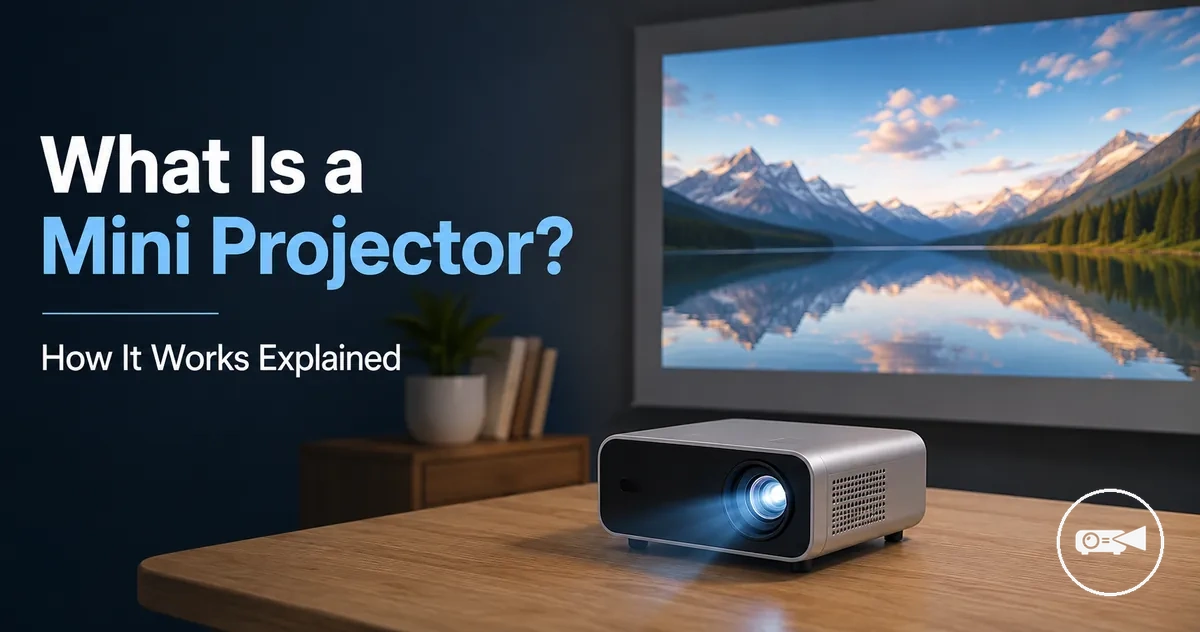
Mini Projector Meaning and Basic Projection Logic
A mini projector is a compact projector that projects a digital image or video onto a screen or another suitable surface. It uses the same core projection principle as a standard projector while prioritizing a smaller size for portability and flexible placement. A mini projector combines a light source, display technology, and a lens to create a projected image. Image quality is influenced by the projector's display technology, available brightness, and the amount of room light where it is used.
A mini projector combines a light source , display technology , and a lens to create a projected image .
A mini projector forms a projected image by directing light from its internal light source through display technology, such as DLP or LCD, before the lens enlarges and focuses the image onto a screen or wall. According to projector manufacturers including XGIMI and Epson, the display technology determines how the image is created, while the lens controls how it is projected onto the viewing surface. For example, a compact projector placed on a tabletop can produce a large image on a nearby wall, although brightness and perceived image quality are typically better in a darker room with lower ambient light. The viewing experience therefore changes with room light, the projector's light source, and the display technology used by the model.
The following section explains the main components and features that make a mini projector work.
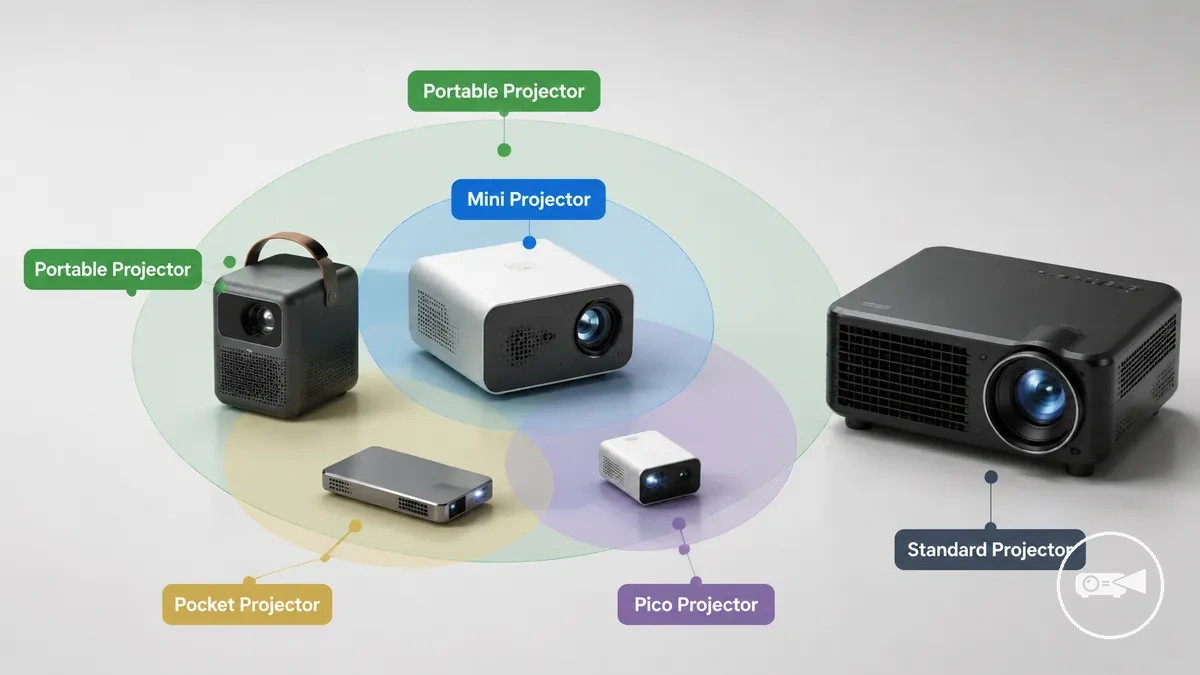
A portable projector, pico projector, and mini projector are closely related terms, but they are not identical categories. A pico projector usually describes the smallest portable projector designs, while a mini projector is a broader category that can include larger compact projectors without becoming the same as a standard projector. The following section explains the main components and features that make a mini projector work.
Table of Contents
What a Mini Projector Is
A mini projector is a compact projector designed to display an image or video onto a screen or another viewing surface. It performs the same basic projection function as a larger projector while using a smaller and easier-to-carry design. A mini projector is defined by its ability to project visual content rather than by a fixed physical size.
A mini projector is defined by its ability to project visual content rather than by a fixed physical size.
What a Mini Projector Is is easier to understand when you can identify the device, its lens, and the surface receiving the projected image.
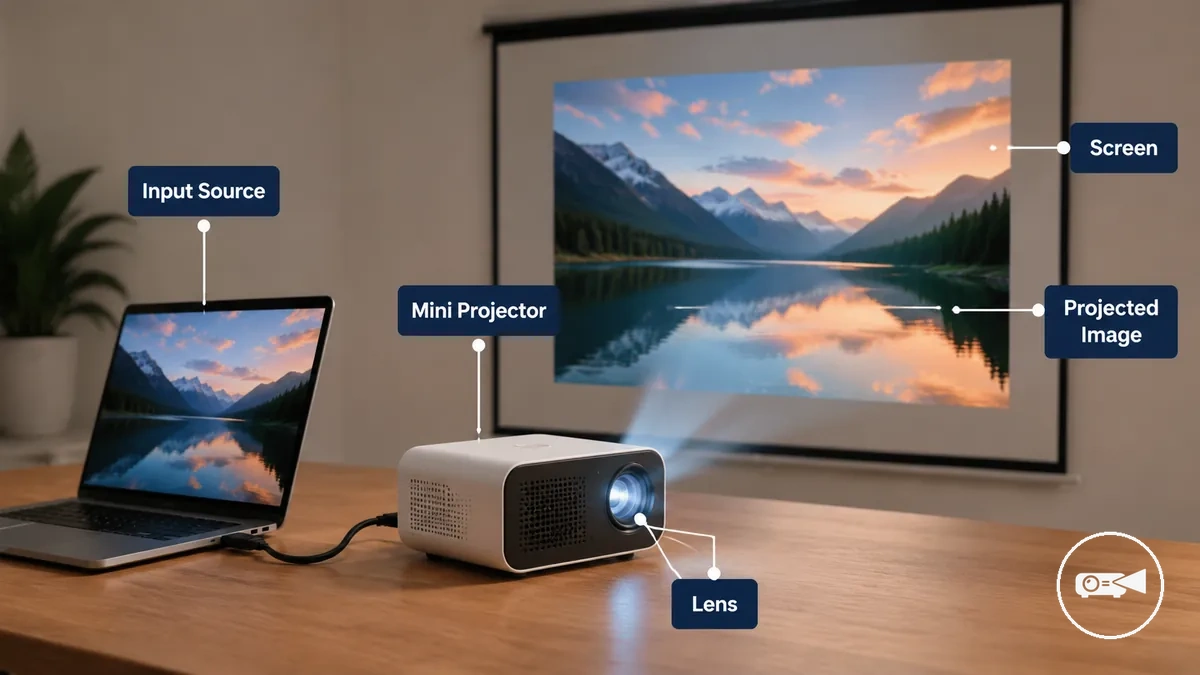
A mini projector receives content from an input source, such as a laptop, smartphone, streaming device, or media player, and projects that content onto a larger viewing surface. Many models are portable and lightweight, while features such as wireless connectivity, a built-in battery, or integrated speakers are available only on certain models. The compact design makes a mini projector suitable for temporary setups in homes, classrooms, meeting rooms, or travel situations without changing its primary purpose as a projector.
The final viewing experience is influenced by the projection surface, room lighting, and the features included with the selected model.
For example, a user can connect a mini projector to a laptop to display a presentation or mirror a phone screen to watch a movie on a wall. The final viewing experience is influenced by the projection surface, room lighting, and the features included with the selected model.
Mini Projector, Portable Projector, and Pico Projector Boundaries
A mini projector is a compact projector, but the terms portable projector, pocket projector, and pico projector are overlapping category labels rather than fixed definitions. Manufacturers and users often apply these labels differently, so they usually describe size, portability, or intended use instead of an official product classification.
A mini projector commonly refers to a compact projector for general portable use.
The labels are often treated as identical, but they usually emphasize different characteristics. A mini projector commonly refers to a compact projector for general portable use. A portable projector highlights mobility, while a pocket projector and a pico projector typically refer to smaller and more lightweight designs intended for maximum portability. The comparison below shows how these labels usually overlap without defining strict product categories.
| Term | Typical meaning |
|---|---|
| Mini projector | A compact projector designed for everyday projection with an emphasis on portability. |
| Portable projector | A lightweight projector intended to be carried between locations, regardless of whether it is classified as mini. |
| Pocket projector | A very small projector designed for easy carrying and quick temporary use. |
| Pico projector | A category label commonly applied to the smallest projector designs that prioritize maximum portability. |
A standard projector belongs to a larger projector category with a larger body than compact projector designs. This boundary is based mainly on physical size and portability rather than image quality, so the labels describe product categories instead of performance rankings. For example, a lightweight projector carried between meeting rooms may be called portable even if it is larger than a pico projector.
For a broader size-based comparison, see mini projector compared with standard projectors .
A mini projector remains the central category, while portable, pocket, and pico projector labels provide additional context about size and mobility. For a broader size-based comparison, see mini projector compared with standard projectors.
How a Mini Projector Creates an Image
A mini projector creates a projected image by using a light source, an imaging system, and a lens to enlarge visual content from a source device onto a wall or screen. The image-creation process follows a consistent projection path, while the final image is influenced by brightness, resolution, projection distance, the viewing surface, and room light.
The diagram below organizes that path from the source signal to the final image on the viewing surface.
How a Mini Projector Creates an Image becomes easier to understand when the projection path is viewed as a simple sequence from signal to projected image. The diagram below organizes that path from the source signal to the final image on the viewing surface.
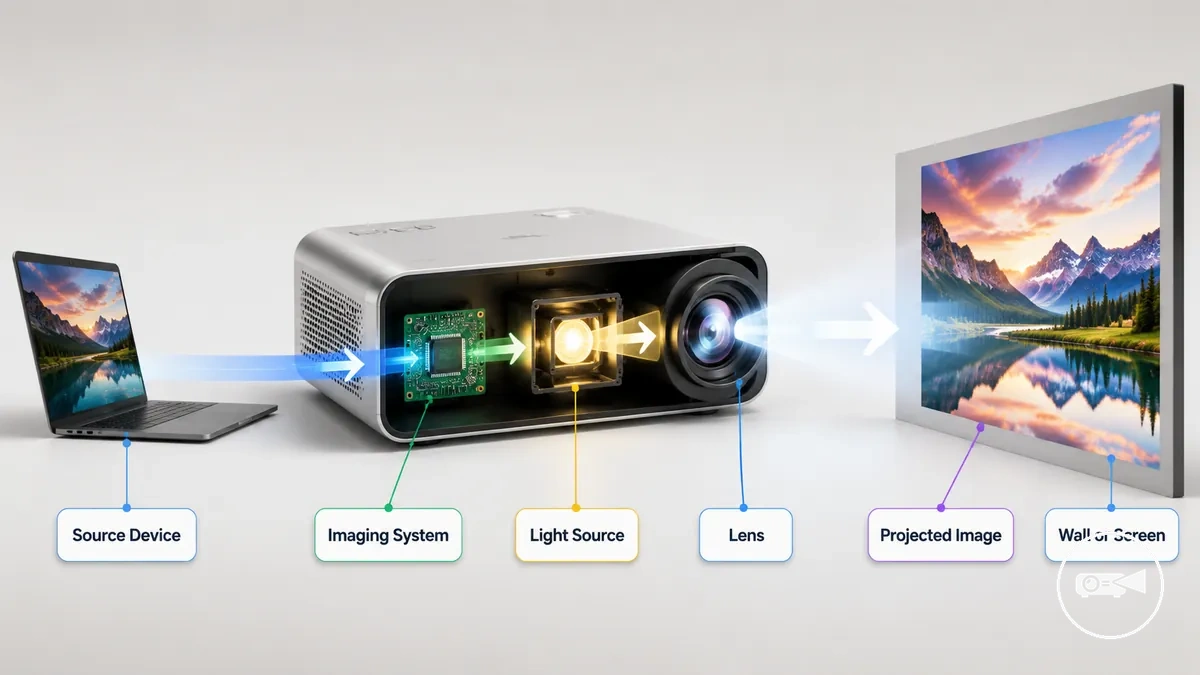
- Source device or media signal → sends image or video data to the projector.
- Imaging system → converts the signal into a visual image.
- Light source → illuminates the image created by the imaging system.
- Lens → focuses and enlarges the light path before projection.
- Wall or screen → receives the projected image for viewing.
A smooth screen or clean wall provides the viewing surface for the projected image, while the lens adjusts focus so the image appears as sharp as the projector and surface allow. For example, projecting onto a dedicated screen in a dim room usually produces clearer visible detail than projecting onto a textured wall in bright ambient light.
The same image-creation process is used in LED , DLP , LCD , and laser -based mini projectors, but each technology generates and directs light differently.
The same image-creation process is used in LED, DLP, LCD, and laser-based mini projectors, but each technology generates and directs light differently. Rather than producing identical results, the projected image can differ in brightness, colour reproduction, contrast, and sharpness according to the display technology, projector design, projection distance, and room-light conditions.
Light Source, Imaging System, Lens, and Projection Surface
Light source, imaging system, lens, and projection surface are the four image-path elements that determine how a projected image is produced and viewed. Each element has a distinct function, and its operating condition influences brightness, focus, clarity, or screen visibility without changing the underlying projection mechanism.
| Part | Function | Condition | Effect on image |
|---|---|---|---|
| Light source | Provides the illumination required for projection. | When sufficient light reaches the image path. | Supports brightness and improves screen visibility, particularly in lower ambient light. |
| Imaging system | Forms the projected image from the incoming signal. | When image formation is processed correctly. | Maintains image clarity and preserves visible detail. |
| Lens | Focuses the projected image onto the viewing surface. | When focus matches the projection distance. | Produces a sharper image on the screen or wall. |
| Projection surface | Displays the projected image. | When the wall or screen has a smooth, suitable viewing surface. | Improves perceived clarity and screen visibility compared with an uneven or highly textured surface. |
The light source, imaging system, lens, and projection surface contribute different functions that together determine the final viewing result. For example, a correctly focused lens cannot compensate for insufficient illumination, and a brighter light source cannot fully offset an unsuitable projection surface. Image quality is highest when illumination, image formation, focus, and the viewing surface all support clear projection under the same viewing conditions.
Main Components of a Mini Projector
The components of a mini projector are the physical and functional parts that enable image projection, user operation, and power management. Core components include the lens, ports, cooling vents, controls, housing, and a power input, while built-in speakers, a battery, or wireless features are included only on models designed with those functions.
| Component | What it does | What can vary | Why it matters |
|---|---|---|---|
| Lens | Projects and focuses the image. | Focus adjustment and lens design. | Determines image sharpness at the viewing distance. |
| Ports | Accept input signals and power connections. | Connector types and the number of available ports. | Allow compatible input sources and external devices to connect. |
| Speakers | Provide built-in audio output. | Included on some models and omitted on others. | Enable sound playback without requiring external speakers. |
| Cooling vents | Release heat from the internal systems. | Vent position and airflow design. | Help maintain stable operation in a compact housing. |
| Power input or battery | Supplies operating power. | Some models require mains power, while others include a rechargeable battery. | Determines whether the projector can be used away from a power outlet. |
| Controls and housing | Provide user operation and protect internal parts. | Button layout, touch controls, and enclosure design. | Support everyday handling and protect the built-in systems. |
Visible components help identify how a mini projector is designed to function without repeating the complete image-creation process. The lens controls focus, ports receive signal and power connections, cooling vents manage heat, and the housing protects the internal systems. For example, locating the HDMI port, power input, and focus control before use helps confirm how the projector connects and operates.
Inspecting the visible parts before use quickly reveals which features the specific unit includes.
Model variation determines which built-in features are available while preserving the same core component categories. For example, one mini projector may include integrated speakers, a rechargeable battery, and wireless connectivity, whereas another provides only wired ports and requires external power. Inspecting the visible parts before use quickly reveals which features the specific unit includes.
Lens, Ports, Cooling, Speakers, and Power System
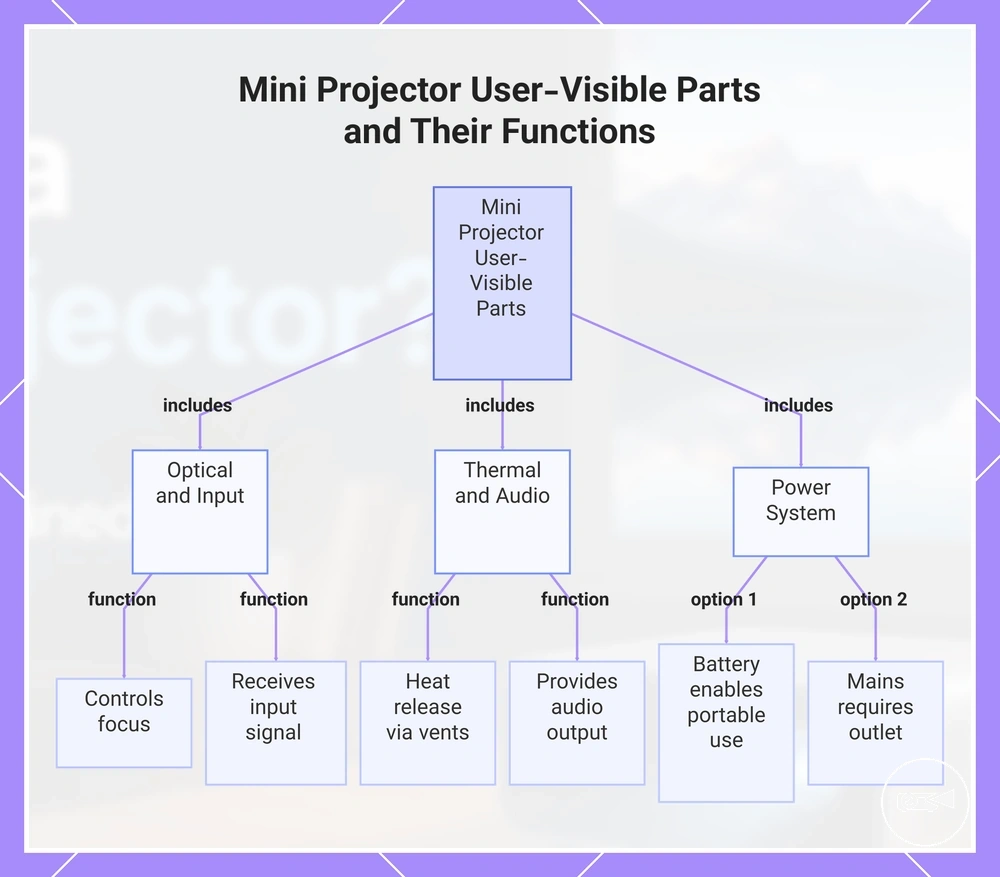
The lens, ports, cooling, speakers, and power system are the user-visible parts that most directly affect everyday operation. Each part performs a specific function that influences image focus, input, ventilation, audio, or the available power source.
When a mini projector is used in different environments, its compact design makes these visible parts especially important.
When a mini projector is used in different environments, its compact design makes these visible parts especially important. For example, a model with a built-in battery can operate away from a wall outlet, while a mains-powered model requires continuous external power. Likewise, the available ports, audio features, and cooling design determine how the projector can be used during normal operation.
- Lens: The lens controls focus, and correct focus improves image sharpness at the viewing distance.
- Ports: The ports receive an input signal from compatible devices, and the available connection ports determine which signal sources can be connected.
- Cooling: Cooling vents provide ventilation that helps release heat, supporting stable operation in a compact body.
- Speakers: Built-in speakers provide audio output when included, while models without integrated speakers require an external audio device.
- Power system: The power system uses either a rechargeable battery or an external power source, and the available option determines whether the projector can operate away from a power outlet.
This chart shows the main user-visible parts of a mini projector and their specific functions that affect everyday operation.
Mini Projector Display Technologies
Display technology refers to the imaging method and light-source design a mini projector uses to create and project an image. Technology labels such as LED, DLP, LCD, and laser indicate how image formation is achieved and help explain expected differences in brightness, color, sharpness, image size expectations, and cost. The final viewing experience also depends on the projector's optics and resolution.
| Technology | What the label means | Common strength | Common limitation |
|---|---|---|---|
| LED | Uses LEDs as the light source. | Efficient operation and compact design. | Brightness is often lower than comparable laser-based designs. |
| DLP | Uses a digital micromirror imaging method. | Often provides good contrast and smooth motion. | Image quality still depends on optics, brightness, and resolution. |
| LCD | Uses liquid crystal display panels to form the image. | Commonly offers strong color reproduction at an accessible cost. | Contrast and sharpness depend on panel quality and optical design. |
| Laser | Uses a laser light source for illumination. | Can deliver higher perceived brightness and stable color performance. | Typically has a higher cost expectation than many LED designs. |
Display technology directly influences how a mini projector renders an image, but it does not determine image quality on its own. The imaging method works together with the light source, optics, and native resolution to affect brightness, color accuracy, sharpness, perceived contrast, and practical image size. For example, two mini projectors using DLP technology can produce noticeably different results if their optics, brightness output, or native resolution differ.
A common misconception is that one display technology is always the best choice.
A common misconception is that one display technology is always the best choice. In practice, LED, DLP, LCD, and laser each have characteristic strengths and limitations, while the complete projector design ultimately determines the viewing experience rather than the technology label alone.
LED, DLP, LCD, and Laser Projection
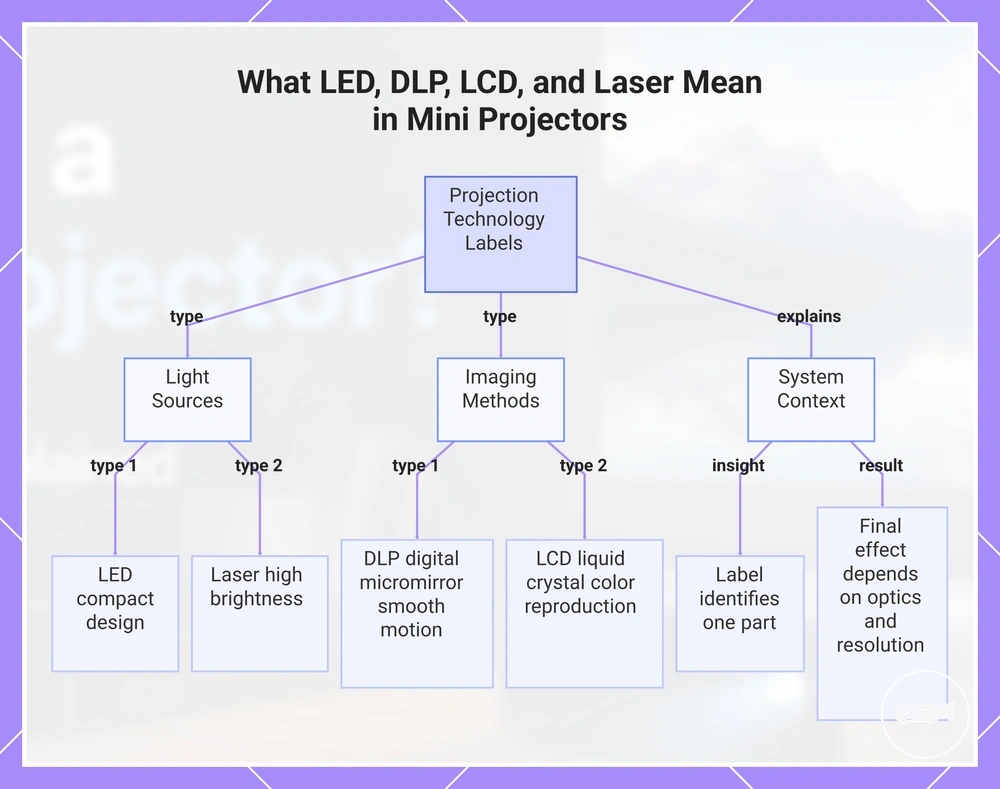
LED, DLP, LCD, and laser are technology labels that describe different ways a mini projector creates or illuminates a projected image. LED and laser identify the light source, while DLP and LCD identify the imaging method that forms the projected image.
A technology label identifies only one part of the projection system rather than a fixed level of image quality.
A technology label identifies only one part of the projection system rather than a fixed level of image quality. For example, a mini projector can combine a laser light source with a DLP imaging method, so the final effect also depends on the optical system and native resolution.
- LED: LED is a light source that supports compact, energy-efficient projector designs, although its effect on the projected image depends on the complete projection system.
- DLP: DLP is an imaging method that creates the projected image with digital micromirrors and is commonly associated with smooth motion and perceived contrast, depending on implementation.
- LCD: LCD is an imaging method that forms the projected image with liquid crystal panels and is commonly associated with strong color reproduction and image clarity, although optical design also influences the result.
- Laser: Laser is a light source that can support higher perceived brightness for the projected image, but it is commonly associated with a higher cost than many LED-based light-source designs.
This chart explains the different projection technology labels, showing that LED and laser are light sources, DLP and LCD are imaging methods, and that these labels identify only one part of the system, not a fixed quality level.
Common Mini Projector Types
Mini projector types are descriptive labels that group compact projectors by size, portability, smart features, throw behavior, or power source. These type labels help explain what kind of mini projector a device is, but they are not official product classes, and one projector can fit more than one category.
| Type label | Main distinction | Typical expectation | Boundary note |
|---|---|---|---|
| Pico | Very small physical size. | Designed for maximum portability and basic projection. | Can also be battery-powered or include smart features. |
| Compact size for easy carrying. | Balances portability with more features than many pico designs. | The size boundary between pocket and pico differs by manufacturer. | |
| Portable smart | Built-in operating system and smart features. | Supports wireless connectivity and apps without requiring a separate streaming device. | This label describes features rather than physical size. |
| Battery-powered | Internal rechargeable power source. | Operates away from mains power for a limited runtime. | Can overlap with pico, pocket, or portable smart types. |
| Short-throw | Projects a large image from a shorter placement distance. | Helps create larger screen sizes where room space is limited. | This label describes projection behavior rather than projector size. |
Mini projector types mainly differ by portability, power source, built-in smart features, and placement requirements. For example, a portable smart projector emphasizes apps and wireless features, while a short-throw projector emphasizes large images from a shorter distance. A battery-powered projector adds portable operation, although runtime remains limited by battery capacity.
A common misconception is that these labels represent separate or complete categories.
A common misconception is that these labels represent separate or complete categories. In practice, they often overlap because a single mini projector can be both pocket-sized and battery-powered or combine smart features with a short-throw design. Type labels should also not be confused with display technology labels such as LED, DLP, LCD, or laser, which describe how the projected image is created rather than the projector's format.
Pico, Portable Smart, and Short-Throw Mini Projectors
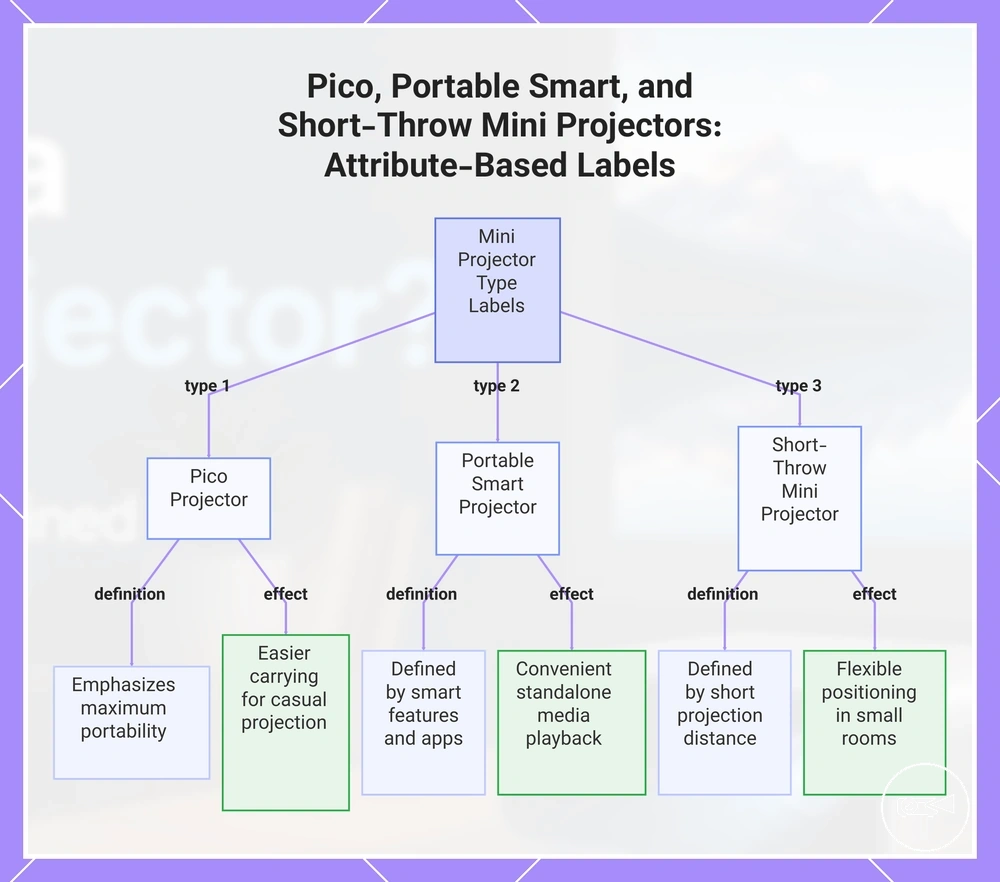
Pico projector, portable smart projector, and short-throw mini projector are type labels that describe different user expectations rather than separate product families. A single mini projector can fit more than one label because each label identifies a different attribute.
- Pico projector: A pico projector is defined by its size and emphasizes maximum portability. Its practical use effect is easier carrying for casual projection, although compact size does not determine its smart features or power source.
- Portable smart projector: A portable smart projector is defined by its smart features, including built-in apps or wireless functions when supported. Its practical use effect is more convenient standalone media playback without requiring a separate streaming device.
- Short-throw mini projector: A short-throw mini projector is defined by its placement, producing a large image from a shorter projection distance. Its practical use effect is more flexible positioning when available room space limits the distance between the projector and the screen.
This chart shows how the three mini projector type labels (pico, portable smart, short-throw) are defined by different attributes, allowing a single device to fit multiple labels.
What Mini Projectors Are Used For
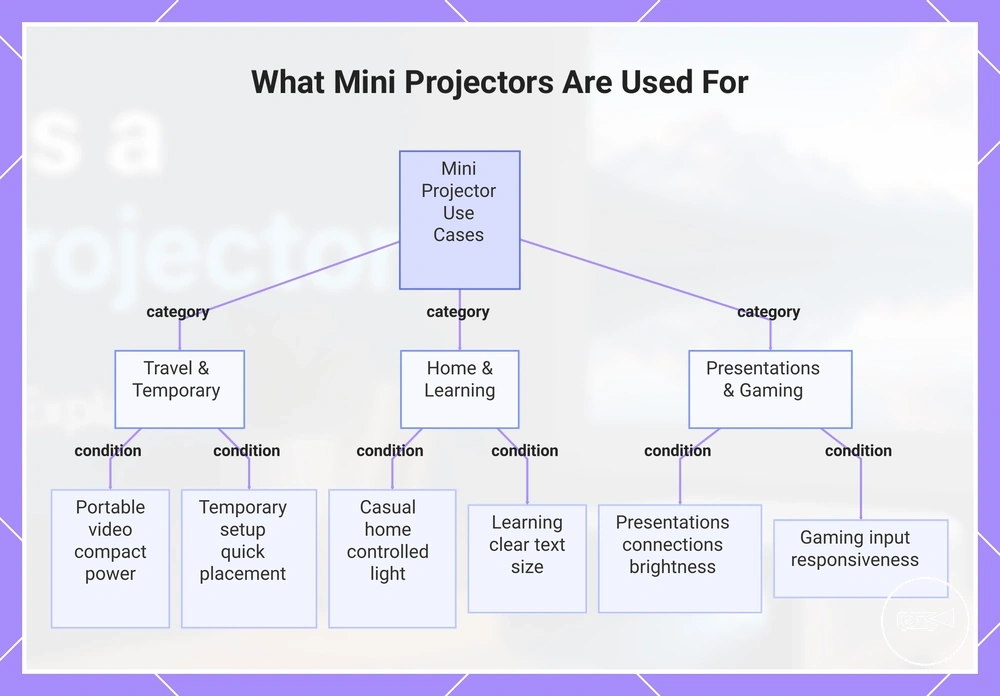
Mini projectors are commonly used for portable video, casual home viewing, presentations, travel, gaming, learning, and temporary screen setups. These uses are practical when brightness, connection options, power, available space, and room light match the viewing situation.
Different viewing situations change how well a mini projector fits.
Different viewing situations change how well a mini projector fits. Indoor home viewing usually benefits from controlled lighting, while travel favors compact portable projection and flexible power options. Presentations and learning environments require suitable connection options and enough brightness for a readable image, while gaming is a better fit when the projector supports the intended input source and acceptable display responsiveness.
Use cases become easier to match when the viewing conditions are considered first.
Use cases become easier to match when the viewing conditions are considered first. The following examples show the typical purpose, the needed condition, and the likely fit or limitation.
- Portable video and travel: Suitable when compact size, portable power, and limited luggage space are priorities. It is a practical fit for temporary entertainment rather than a permanent screen setup.
- Casual home viewing: Best suited when room light is controlled and a suitable wall or projection surface is available. External speakers can improve the experience if built-in sound is limited.
- Presentations: Appropriate when the projector offers compatible connection options and enough brightness for the room. Bright meeting spaces may require a higher-brightness model for a readable image.
- Gaming: Suitable when the input source is supported and display responsiveness matches the game type. Fast-paced games generally benefit from lower input latency than casual gaming.
- Learning: Useful for educational videos, lessons, and study sessions when projected text remains clear at the planned viewing size.
- Temporary setup: A good fit for occasional screen setups where quick placement is more important than permanent installation. The available surface and placement space influence the final viewing experience.
Brightness, connection options, power, and room light determine how suitable each use case is. A mini projector supports many viewing situations, but it should not be expected to replace every television or standard projector.
Brightness, connection options, power, and room light determine how suitable each use case is.
After choosing the most suitable use case, understanding mini projector setup basics helps match the projector to the available space and projection surface without turning this section into a setup guide.
This chart shows the main use cases for mini projectors and the key conditions that determine suitability for each.
This chart shows the main use cases for mini projectors and the key conditions that determine suitability for each.
Benefits and Limitations of Mini Projectors
Mini projectors provide clear benefits and practical limitations, so their value depends on the viewing situation rather than on a single feature. The main trade-offs involve portability, screen flexibility, brightness, resolution, speakers, battery life, fan noise, room-light sensitivity, and overall suitability for the intended use.
| Attribute | Benefit | Limitation | What it means |
|---|---|---|---|
| Portability | Compact size makes carrying and storing the projector easy. | Smaller designs may offer fewer built-in features. | Ideal for travel and temporary setup. |
| Screen flexibility | Projects onto walls or screens at different image sizes. | Image quality depends on the projection surface and available space. | Useful where a fixed display is unavailable. |
| Brightness | Produces a comfortable image in darker environments. | Bright room light reduces image visibility. | Controlled lighting improves viewing quality. |
| Resolution | Higher native resolution delivers sharper images. | Lower native resolution reduces fine detail on larger projections. | Viewing distance affects perceived sharpness. |
| Sound | Built-in speakers provide convenient everyday audio. | Speaker output may not fill larger rooms. | External speakers improve sound when greater volume is needed. |
| Battery life | Battery-powered models support portable use away from mains power. | Viewing time is limited by battery capacity. | Long sessions may require external power. |
| Fan noise | Cooling helps maintain normal operation. | Fan noise can become noticeable in quiet surroundings. | Background audio often makes the fan less noticeable. |
| Room light | Darker rooms improve contrast and perceived image quality. | Strong ambient light lowers image clarity. | Lighting conditions directly influence viewing comfort. |
Travel, temporary entertainment, and flexible presentation spaces highlight the benefits of portability and screen flexibility. For example, moving a projector between hotel rooms, classrooms, or meeting spaces is usually easier than relocating a fixed television because the display size can change with the available wall or screen.
For a broader decision framework, see mini projector benefits and limitations .
Brightness, resolution, speakers, battery life, fan noise, and room-light sensitivity represent the main practical limitations. These trade-offs help determine whether a mini projector matches the intended viewing environment rather than indicating overall quality. For a broader decision framework, see mini projector benefits and limitations.
A common misconception is that a mini projector is the right replacement for every display.
A common misconception is that a mini projector is the right replacement for every display. In practice, a larger projector or another display is often a more realistic choice when brighter images, stronger built-in sound, or consistent viewing in well-lit rooms is the priority.
Continue with the mini projector guide to explore the topic in more detail.
Understanding these trade-offs makes it easier to choose the most suitable display for your needs. Continue with the mini projector guide to explore the topic in more detail.