
Portable monitor for gaming performance and device fit
A portable monitor can support gaming when the gaming device, display output, refresh rate support, resolution fit, input lag, response time, power, and setup conditions work together. A portable gaming monitor may provide a good experience for some users but not others because performance fit and device fit depend on the capabilities of both the display and the connected device. Performance fit and device fit are the main decision frame.
Console gaming may depend on the HDMI connection path and the display modes supported by both the console and the portable monitor. Handheld gaming often relies on USB-C video output, available power, and a stable setup for comfortable play. Laptop gaming can depend on graphics output, screen scaling, cable quality, and the intended use of the second screen. A portable monitor may suit these scenarios when the device output and display capability are compatible.
A mismatch between refresh rate, resolution, input lag, response time, power, and connection quality can limit the overall gaming experience even if one specification appears strong. Refresh rate affects perceived smoothness, while resolution, supported signal, and connection stability influence how well the display performs in a real setup. A feature may provide limited value if the gaming device cannot use it or the connection path does not support it. Evaluating these factors together is usually a safer way to judge whether a portable monitor fits a gaming setup.
This page focuses on how a portable monitor fits gaming needs through performance, compatibility, setup reliability, and value rather than product rankings or detailed setup instructions. It provides a decision framework before later sections examine individual considerations in greater detail. For broader context, continue with the portable monitor guide.
What makes a portable monitor suitable for gaming
A portable monitor is suitable for gaming when its display performance, connection path, power behavior, and physical setup fit the gaming device it is connected to. Whether a specific setup performs well depends on how these factors work together rather than on a single specification. The four suitability pillars are display performance, connection path, power behavior, and physical setup.
What makes a portable monitor suitable for gaming becomes clearer when the main fit factors are viewed together. The annotated example below highlights the display, connection, power, and setup elements that influence gaming use.
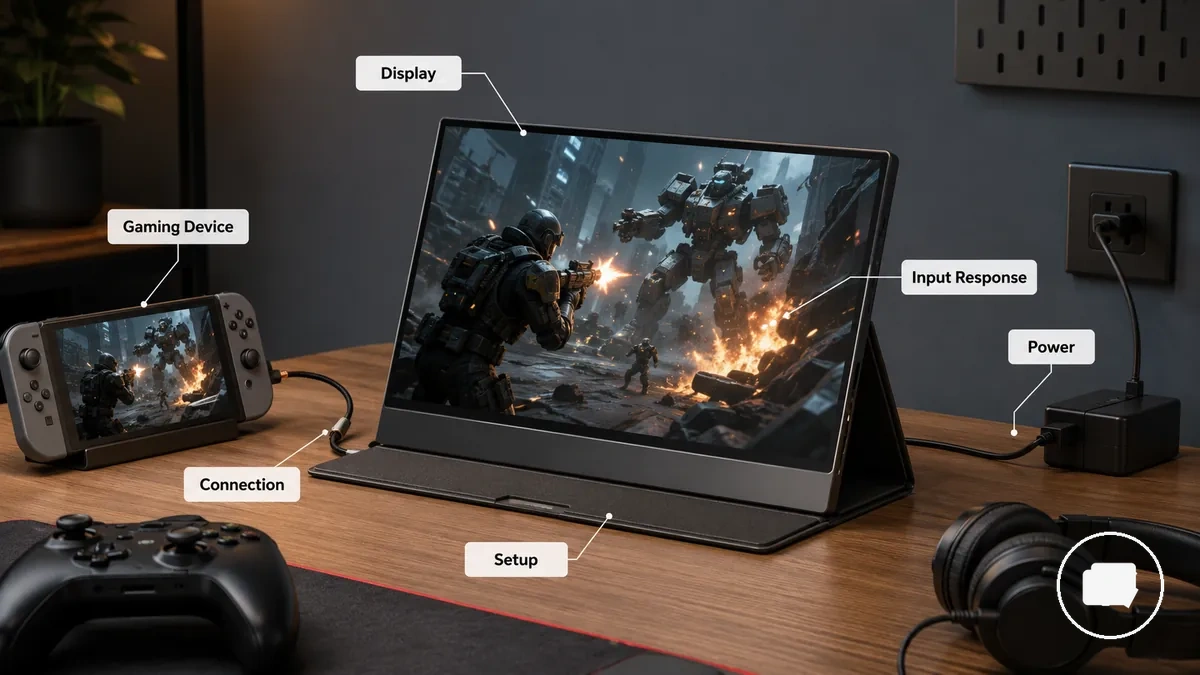
A portable monitor is suitable in a gaming context when it supports the gaming requirement instead of only displaying an image. Display performance, including refresh rate, resolution, and input response, should align with the intended play quality, while the connection path through HDMI or USB-C, available power, and physical setup should support reliable use. A monitor may work as an external display but still differ from one that works well for gaming if these conditions are not met.
The checklist below summarizes the main suitability factors before assessing detailed specifications.
- Display performance: Refresh rate, resolution, and input response should match the expected gaming experience.
- Connection path: HDMI or USB-C should match the supported output of the gaming device.
- Power: Power behavior should support stable operation throughout the gaming session.
- Setup stability: A stable stand and reduced cable strain help improve setup reliability.
- Device output: Play quality also depends on whether the gaming device can deliver a compatible display signal.
A portable monitor that works well as a general second screen may not provide the same gaming experience because gaming places greater emphasis on display performance, responsive input, connection reliability, and stable physical setup.
Gaming performance specs to check before buying
Gaming performance specs matter only when they match the gaming device, its device output, and the intended gaming use. A portable monitor with stronger display specifications may offer limited value if the console, handheld, or PC cannot use them through the available connection. Evaluating trade-offs between display capability and device output is more useful than focusing on a single specification.
Gaming performance specs to check before buying become easier to compare when each specification is evaluated by its effect on gaming rather than by headline values alone. The diagram below organizes the main specifications by their influence on gaming performance.
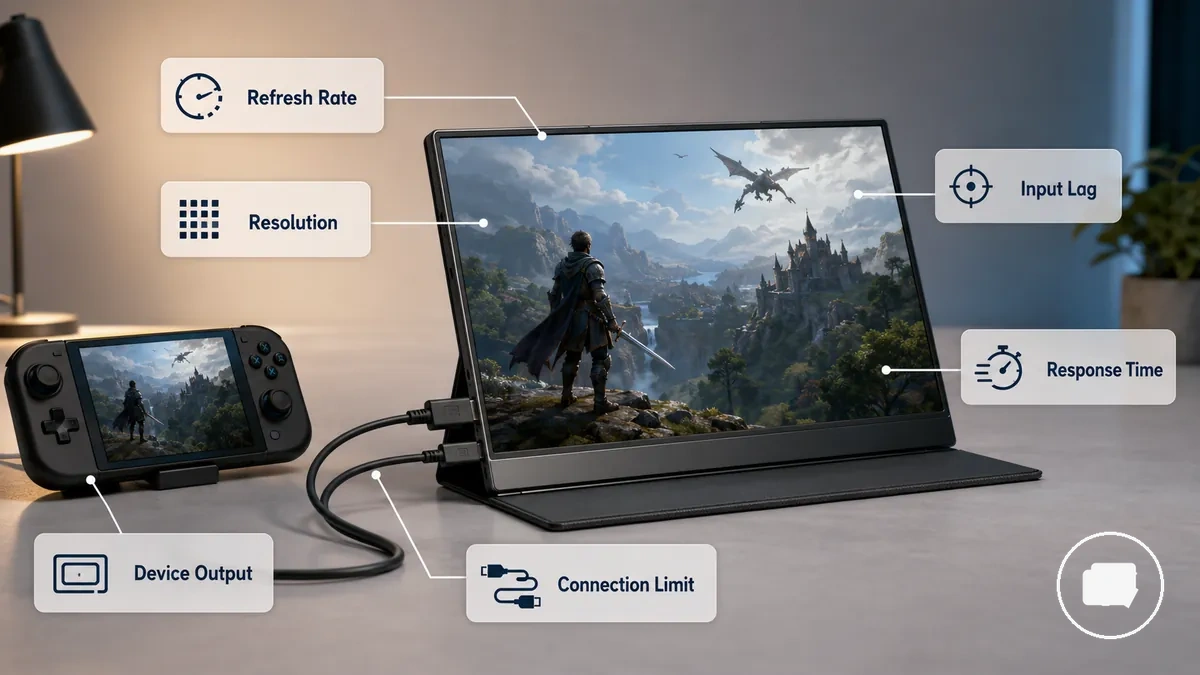
Gaming performance specs include refresh rate, resolution, screen size, input lag, response time, panel behavior, and connection limits. Refresh rate generally affects perceived smoothness, while resolution influences image clarity and scaling. Input lag and response time relate to control feel and motion handling, whereas connection limits determine whether the intended display mode can be delivered through HDMI or USB-C. Together, these specifications form the main performance group to evaluate before comparing products.
The table below organizes each gaming performance specification by what it affects, the condition that changes its value, and a practical decision cue. It helps compare specifications without assuming every attribute carries the same importance.
| Spec | What it affects | Condition that changes value | Decision cue |
|---|---|---|---|
| Refresh rate | Perceived smoothness | Supported frame rate and device output | Prioritize when the gaming device can provide a matching signal. |
| Resolution | Clarity and scaling | Screen size and supported display mode | Select a resolution that fits both the display and the source device. |
| Screen size | Viewing comfort | Viewing distance and portability needs | Balance immersion with portability. |
| Input lag | Control feel | Game type and display processing | Often matters more in timing-sensitive gameplay. |
| Response time | Motion handling | Panel behavior and moving content | Evaluate together with refresh rate. |
| Panel behavior | Image consistency | Display technology and usage conditions | Judge overall viewing quality rather than a single attribute. |
| Connection limits | Supported display mode | HDMI, USB-C, bandwidth, and device output | Confirm the connection supports the intended gaming setup. |
Console gaming may place greater emphasis on supported output modes and connection limits, handheld gaming may give more weight to portability and power-related considerations, and PC gaming may place greater value on refresh rate, resolution, and input response when the hardware supports them. Choosing gaming performance specs according to the intended gaming scenario is usually a more reliable approach than assuming higher specifications always produce better gaming results.
Refresh rate and frame rate limits
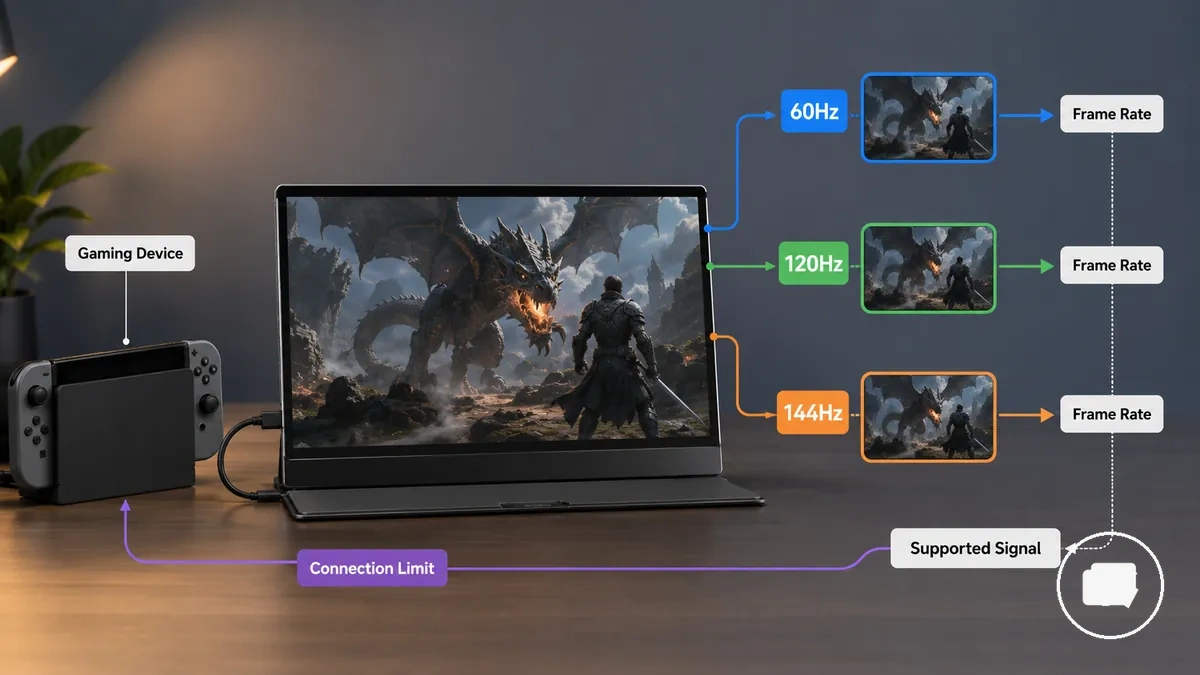
Refresh rate improves perceived motion smoothness only when the gaming device and the game can produce a matching frame rate. A portable monitor with a higher refresh rate may offer limited benefit if the supported signal cannot deliver enough frames. Compatibility between the display, the supported signal, and the gaming device remains the key condition.
Refresh rate describes how often the display updates, while frame rate describes how many frames the gaming device produces. The comparison below shows how 60Hz, 120Hz, and 144Hz relate to practical gaming conditions by comparing display refresh capability with actual frame output.
| Refresh rate | Likely use condition | Device requirement | Practical limit |
|---|---|---|---|
| 60Hz | General gaming | Gaming device outputs a 60Hz supported signal | Higher frame output may not be fully displayed. |
| 120Hz | Smoother motion when supported | Gaming device and game provide a matching supported signal | Additional refresh capability may remain unused if the source cannot match it. |
| 144Hz | High refresh gaming | Compatible gaming device and supported signal | Extra refresh capability may provide limited value when unsupported. |
For example, a PC setup may benefit from a higher refresh rate when both the graphics output and the game can maintain an appropriate frame rate, while a console or handheld may be limited by its supported display output. Choosing a refresh rate is therefore a compatibility decision rather than a specification to maximize in every situation. For broader selection guidance, see portable monitor refresh rate.
Resolution and screen size balance
Resolution delivers the most value when it matches screen size, viewing distance, and the gaming device's supported output. A higher resolution can increase image detail, but the benefit may be limited on a smaller portable monitor or when the gaming device cannot output the selected resolution. A balanced choice considers clarity, interface readability, scaling, and compatibility together.
Resolution and screen size balance becomes clearer when resolution choices are compared by gaming context rather than by resolution alone. The comparison below shows how 1080p, 2K, and 4K relate to screen size, output support, and practical trade-offs.
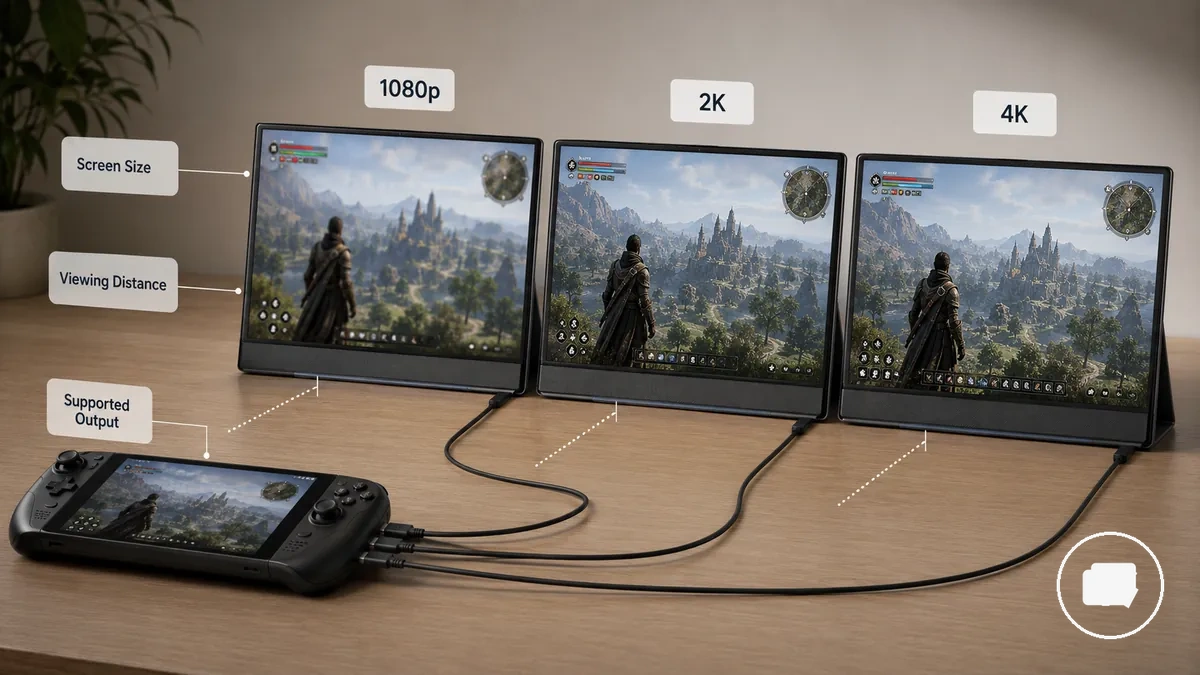
| Resolution choice | Screen size fit | Device condition | Trade-off |
|---|---|---|---|
| 1080p | Common portable screen sizes | Gaming device supports 1080p output | Often balances clarity, scaling comfort, and compatibility. |
| 2K | Medium portable displays | Supported resolution and compatible device output | Can provide more image detail while increasing display demands. |
| 4K | Higher pixel density portable displays | Gaming device supports 4K output | Additional detail may be less noticeable on smaller screens and can require greater output capability. |
For example, a handheld setup may benefit from comfortable interface scaling at a shorter viewing distance, while a desk setup may make additional image detail easier to notice when the gaming device supports it. Resolution choice therefore depends on screen size, pixel density, viewing distance, and supported output rather than resolution alone. For more detailed guidance, see gaming portable monitor resolution.
Input lag, response time, and motion handling
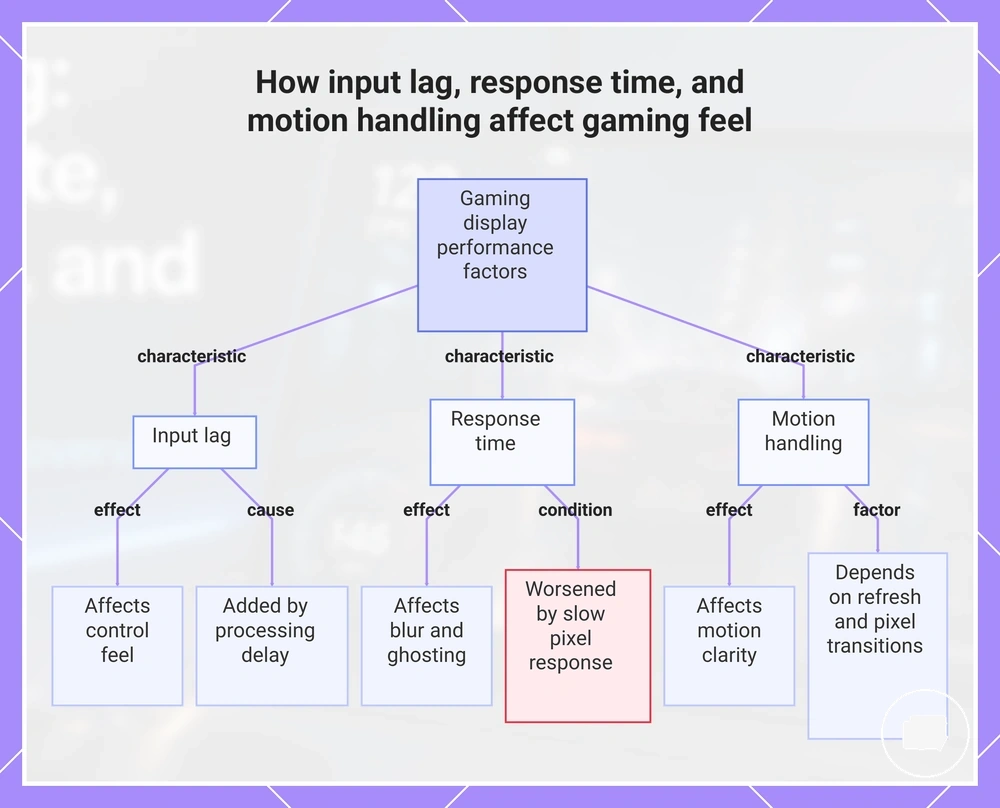
Input lag refers to the processing delay between a player input and the corresponding image appearing on the display. Response time describes how quickly pixel response changes from one image state to another, while motion handling describes how clearly moving content appears during refresh behavior. These characteristics measure different aspects of display performance, and together they can influence gaming feel, including control feel, blur, ghosting, and perceived responsiveness.
- Input lag: Affects control feel because processing delay within the signal path may increase the time before an on-screen action appears.
- Response time: Affects pixel response, which may influence visible blur or ghosting during fast image transitions.
- Motion handling: Affects motion clarity through refresh behavior and display characteristics, so moving objects may appear clearer or less distinct depending on the display and viewing conditions.
If the signal path introduces additional processing delay, gameplay may feel less responsive even when image quality remains consistent. Slow pixel response can make blur or ghosting more noticeable during rapid movement, while motion handling depends on how refresh behavior and pixel transitions work together to present moving images. Because these characteristics describe different aspects of display performance, no single specification determines gaming responsiveness on its own. Evaluating a portable monitor is usually more reliable when input lag, response time, and motion handling are considered together.
This chart shows three key display performance characteristics and their impact on gaming responsiveness, blur, and motion clarity.
Console and handheld gaming compatibility
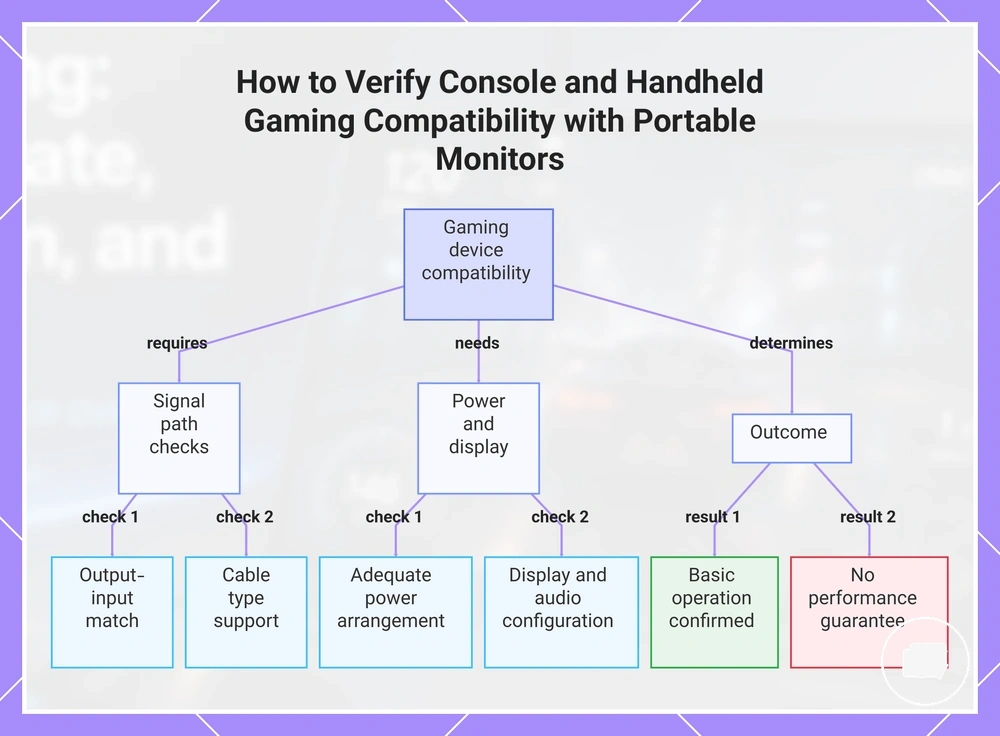
Console and handheld gaming compatibility depends on matching the gaming device's video output, the portable monitor's monitor input, the cable type, available power, and the supported display mode. A compatible signal path is required before display specifications become relevant because each connection condition can affect whether the monitor operates as intended. Verifying these conditions first helps confirm basic device fit.
Compatibility issues can occur when a console or handheld uses a different video output than the monitor input supports, when the HDMI or USB-C cable cannot carry the required signal, or when the available power does not meet the display's operating needs. Even if the portable monitor turns on, an unsupported display mode or connection mismatch may prevent the intended image from appearing. Depending on the connection conditions, the result may be a working display with limited refresh support or a no-signal condition.
Use the checklist below to verify compatibility before comparing gaming performance. It confirms whether the main connection conditions are aligned for basic operation.
- Video output: Confirm the console or handheld provides a compatible video output.
- Monitor input: Check that the portable monitor accepts the required HDMI or USB-C connection.
- Cable type: Verify the cable supports the intended signal path between the gaming device and the monitor.
- Power: Ensure the selected power arrangement can support the portable monitor during use.
- Supported display mode: Confirm the gaming device and monitor share a supported resolution and refresh mode.
- Audio needs: Verify whether audio is handled through the monitor, connected speakers, or another supported output if required.
A portable monitor may be compatible with a console or handheld while still offering different gaming results because supported display modes and connection conditions can limit the usable refresh rate or other display capabilities. Compatibility confirms that the display path can operate when the required conditions are met, but it does not guarantee the best gaming performance. For broader device verification, see gaming device compatibility.
This chart shows the essential checks to verify compatibility between a gaming device and a portable monitor, along with the expected outcome.
HDMI, USB-C, and mini HDMI connection paths
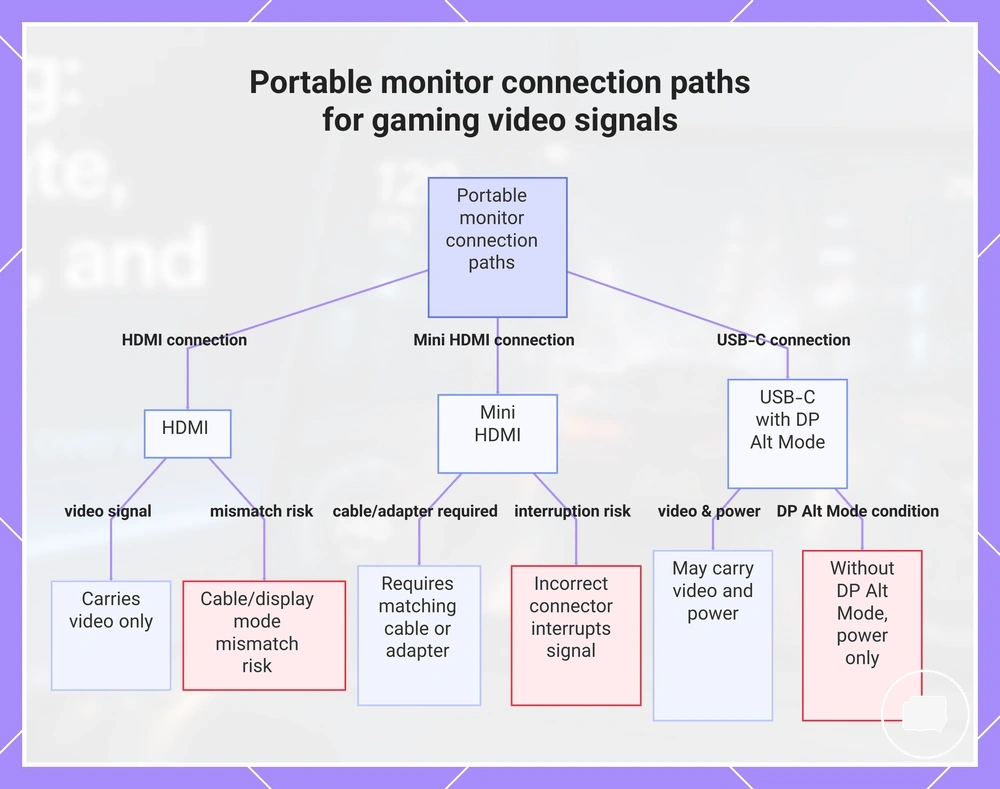
HDMI, USB-C, and mini HDMI connection paths determine how a portable monitor receives a gaming video signal. HDMI and mini HDMI are typically used to carry a video signal, while USB-C may carry a video signal, power, or both when the gaming device and portable monitor support DisplayPort Alt Mode. Video and power can follow separate connection paths, so a portable monitor may still require a separate power input.
- HDMI: Carries a video signal through an HDMI cable when both the gaming device and portable monitor provide compatible HDMI ports. A cable or supported display mode mismatch may prevent the intended display output.
- Mini HDMI: Carries a video signal through a mini HDMI connection and requires a matching cable or a compatible adapter. An incorrect connector type can interrupt the signal route.
- USB-C with DisplayPort Alt Mode: May carry both a video signal and power when the USB-C connection supports DisplayPort Alt Mode. A USB-C connection without video support may provide power only.
- Adapter and cable: An adapter can connect different port types, but successful compatibility depends on the supported signal path rather than the connector shape alone. Not every cable or adapter carries a video signal.
- Power input: A portable monitor may require separate power even when video is delivered through HDMI or USB-C. Confirming the required power input can improve connection reliability.
Cable or adapter mismatches can occur when the selected connection path does not support the required video signal or when USB-C video capability is assumed without confirming DisplayPort Alt Mode support. Adapter success also depends on compatible ports and supported signal paths at both ends of the connection. Before purchasing, verify that the gaming device, monitor input, cable, adapter, and power input support the intended connection path.
This chart shows the three main connection paths (HDMI, Mini HDMI, and USB-C with DisplayPort Alt Mode) and their key capabilities and requirements for delivering a gaming video signal to a portable monitor.
PS5, Xbox, Switch, Steam Deck, and handheld limits
PS5, Xbox, Switch, Steam Deck, and other handheld device families depend on their output type, supported display mode, and connection route to determine portable monitor compatibility. Each device family can have different resolution, refresh rate, and power expectations, so the same portable monitor may behave differently depending on the connected device. These output differences define the practical compatibility limits more than the monitor specifications alone.
| Device family | Typical connection route | Display condition to verify | Common limit |
|---|---|---|---|
| PS5 | HDMI | Supported display mode, resolution, and refresh rate | Available display modes may vary with the monitor input and supported signal path. |
| Xbox | HDMI | Supported display mode and refresh rate | Higher refresh modes depend on compatible output conditions. |
| Switch | Dock to HDMI | Dock connection and supported display mode | External display output depends on the dock connection and supported video mode. |
| Steam Deck | USB-C or dock | USB-C video capability, dock compatibility, and power | Resolution and refresh options may vary with the connection route and power arrangement. |
| Other handhelds | USB-C, dock, or another supported output | Output type, supported display mode, and power expectations | Display capability depends on the device family and supported video mode. |
Device output determines the usable resolution, refresh rate, and connection route rather than the portable monitor alone. The available display mode depends on the combination of the gaming device, monitor input, cable, dock when applicable, and selected video mode, so supported output may vary by model or configuration. Before choosing a portable monitor, verify the intended connection conditions rather than assuming the same display behavior across every device family.
Power, stand, and travel setup factors for gaming
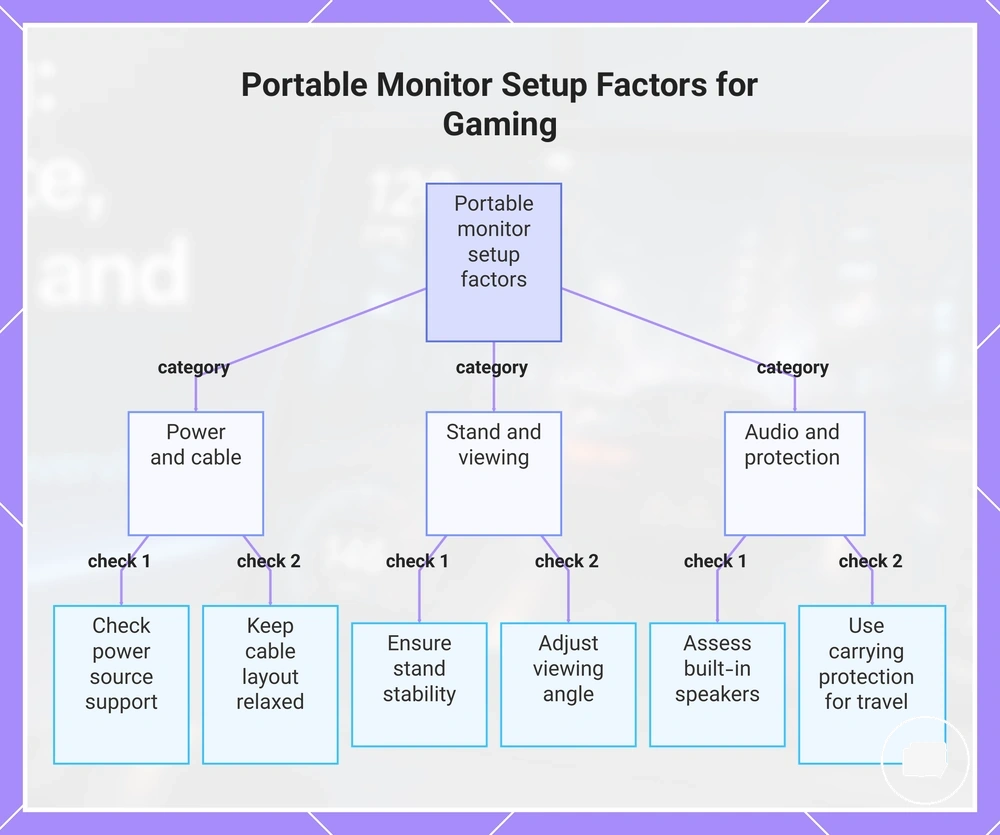
Power, stand, and travel setup factors affect gaming comfort after display performance and compatibility have been confirmed. A desk setup, couch session, hotel stay, or handheld gaming environment can change the importance of power access, stand stability, viewing angle, and cable layout. In practical gaming use, these setup factors often determine long-session reliability more than display specifications alone.
Power source availability can influence whether a gaming session continues without interruption, particularly when a portable monitor requires separate power. Stand design affects stability and viewing angle, while cable layout can reduce cable strain that may otherwise affect connection reliability during movement. Speaker quality and placement may also influence comfort when external audio is unavailable, and carrying protection becomes more relevant during travel setup than permanent desk use. Matching these setup factors to the gaming environment can help reduce interruption risk without turning the process into a full setup guide.
The checklist below summarizes the practical setup factors to review before gaming with a portable monitor. The importance of each factor depends on the intended use context, including desk use, couch gaming, hotel use, or handheld play.
- Power: Check that the available power source can support the portable monitor throughout the expected gaming session.
- Stand: A suitable stand design can improve stability when the desk, table, or seating position changes.
- Viewing angle: Adjust the viewing angle for the gaming position because comfort may vary between desk and portable setups.
- Cable strain: Keep cable layout relaxed to reduce unnecessary cable strain that may affect connection reliability during movement.
- Speakers: Built-in speakers may be sufficient for casual gaming, while different environments may benefit from separate audio solutions.
- Carrying protection: Carrying protection can help reduce handling risk during travel setup, especially when the portable monitor is transported frequently.
This chart summarizes the practical setup factors to check before gaming with a portable monitor, organized by category.
Choosing a portable gaming monitor by use case
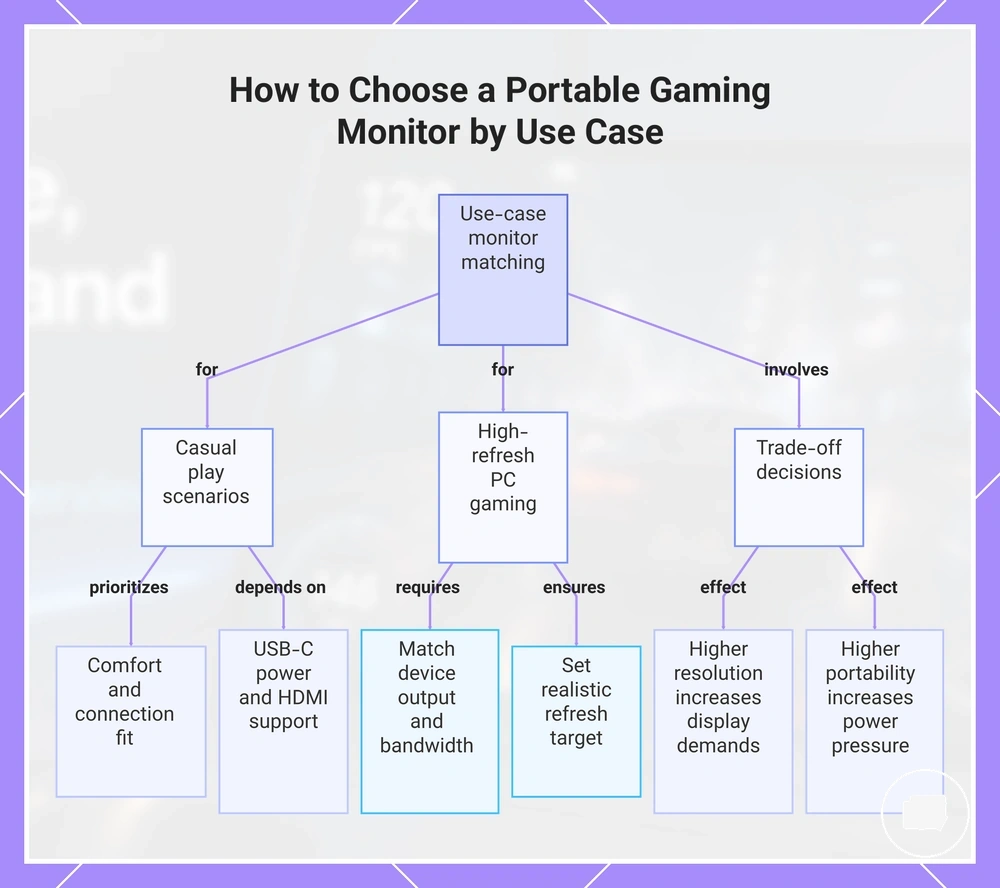
The right portable gaming monitor depends on the use case rather than the highest advertised specification. A suitable choice should match the gaming device, refresh target, resolution need, and setup environment because these factors determine which features provide practical value. This makes use-case matching the main selection frame.
For casual play, console use and handheld use often need different priorities. Handheld use may place more weight on USB-C, power, and portability, while console use may depend more on HDMI support and a supported display mode. In these scenarios, comfort and connection fit can matter more than choosing the highest specification available.
For high-refresh PC gaming, the portable gaming monitor should match the computer's output capability, refresh target, response needs, and available bandwidth. A higher refresh target may be useful only when the gaming device and connection can support it. Performance expectations should therefore stay within the limits of the hardware and supported display configuration.
Trade-off decisions usually involve refresh rate, resolution, portability, power, and price. A higher resolution need can increase display demands, while a higher refresh target may require stronger device output and connection support. More portable setups may also place greater pressure on power and setup environment. The better buying decision is the one that matches the required attribute to an acceptable condition for the intended use case.
- Gaming device: Match the portable gaming monitor to the device output and supported display mode.
- Game type: Casual play and competitive gaming may prioritize different display characteristics.
- Refresh target: Choose a refresh target that the gaming device and connection can support.
- Resolution need: Match resolution to screen size, graphics output, and viewing comfort.
- Connection: Verify that HDMI or USB-C fits the intended setup environment.
- Power and portability: Consider power needs and carrying use when the monitor moves between setups.
The most suitable portable gaming monitor is the one whose monitor priority matches the use case, required attribute, acceptable condition, and trade-off. Applying these decision signals before comparing individual products keeps the selection focused on practical gaming requirements rather than headline specifications.
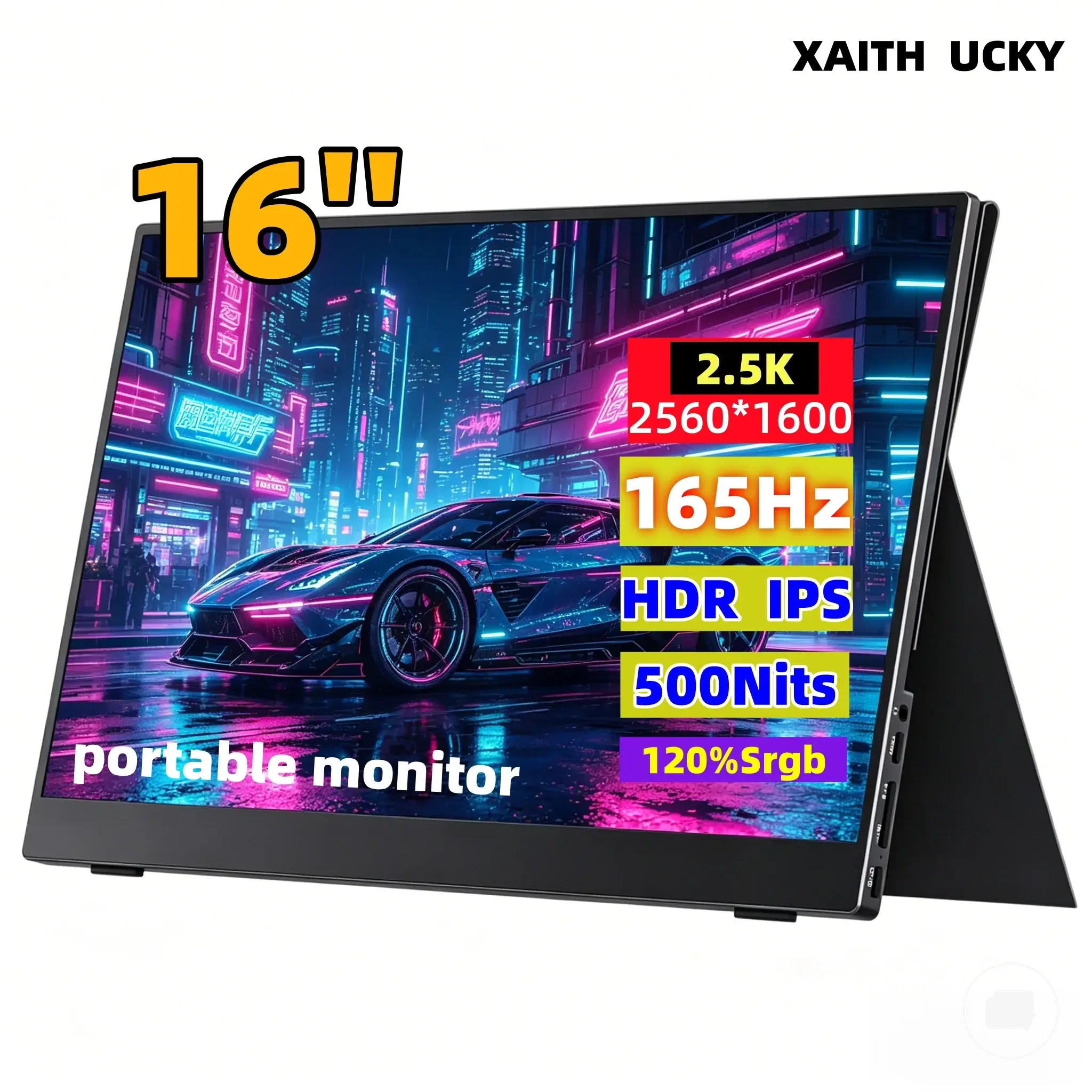
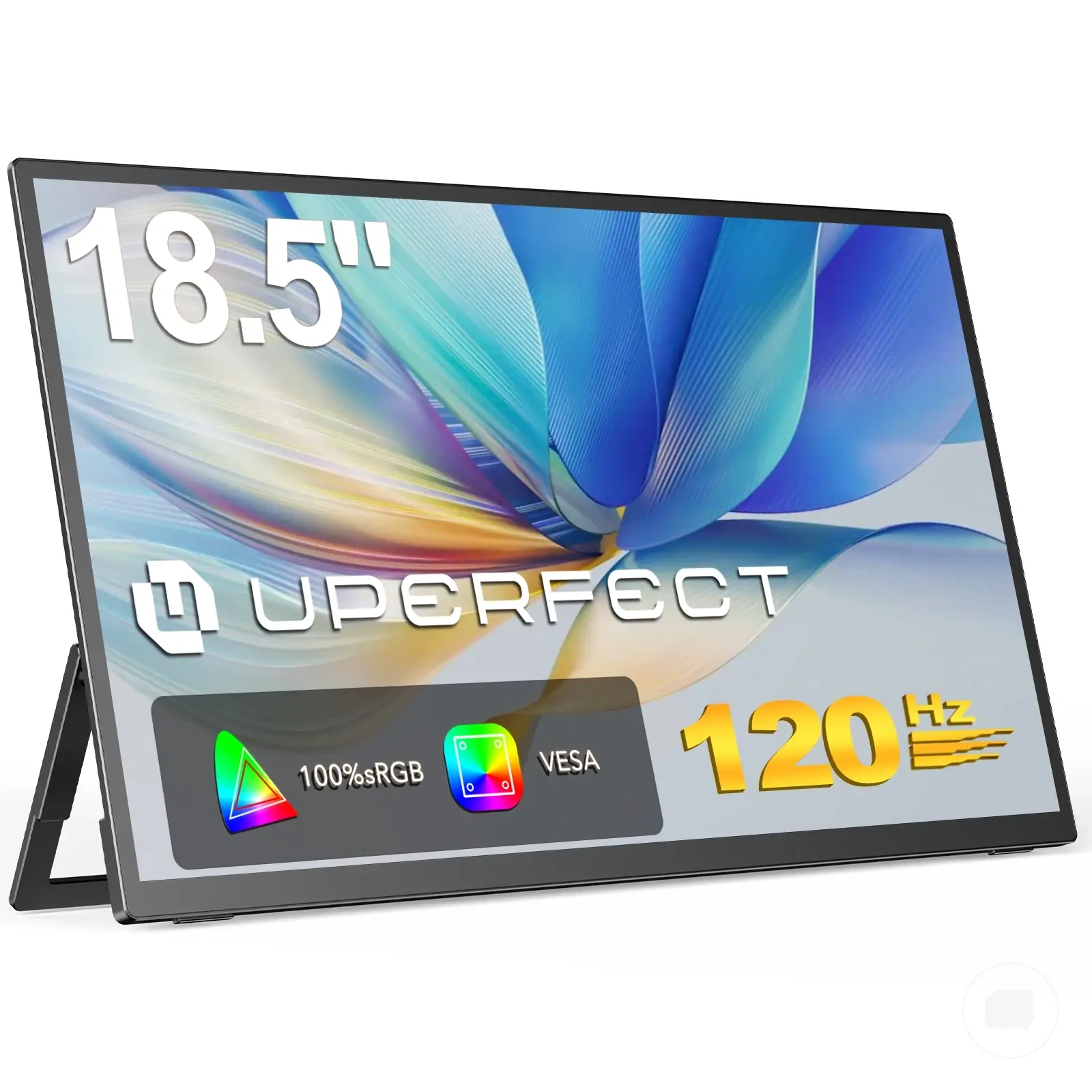
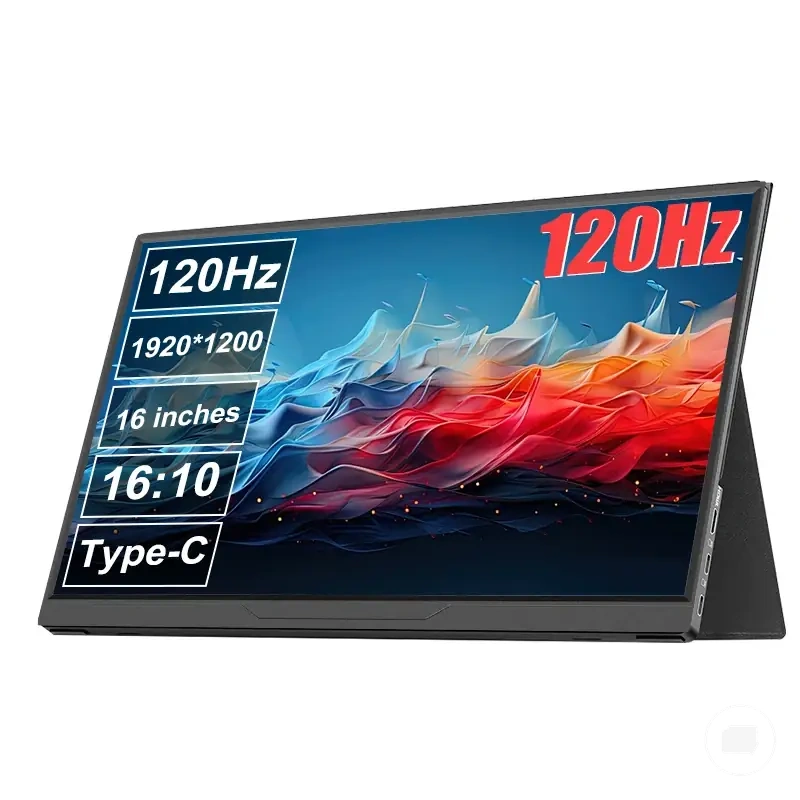
The products below are useful examples for comparing available options. Before buying, check that the compatibility criteria, key features, and product details match your needs.
This chart shows how matching a portable gaming monitor to your specific use case—casual play, high-refresh PC gaming, and key trade-offs—guides a practical selection.
Casual console and handheld play
Casual console and handheld play usually depends on choosing features that support comfort and simplicity instead of the highest display specifications. A portable gaming monitor should match the gaming device, connection type, and play environment because these conditions determine which features are sufficient. For most casual gaming scenarios, convenience is often a higher priority than premium display capabilities.
The features below usually provide a practical balance for casual console and handheld play when they match the intended gaming setup.
- Screen size and resolution: A 1080p display is often sufficient when it suits the screen size and the gaming device's supported output.
- Refresh rate: A 60Hz display may be suitable for many casual gaming sessions, while 120Hz is typically more useful only when the gaming device and games can take advantage of it.
- Connection: HDMI is commonly appropriate for casual console setups, while USB-C may simplify handheld play when the device supports video output.
- Speakers: Built-in speakers can improve convenience when external audio equipment is unnecessary during portable play.
- Power: Power requirements should match the intended play environment because portable setups may depend more on charging options and portability.
These features are usually sufficient for casual console and handheld play when they match the gaming device and expected use. Choosing higher specifications may be worthwhile only when the hardware or gaming expectations require them, making the final choice a condition-based trade-off.
Competitive or high refresh PC gaming
Competitive or high refresh PC gaming depends on both the portable monitor and the source device rather than the monitor alone. GPU output, refresh rate, cable bandwidth, and display responsiveness determine whether higher refresh modes can be used as intended. Evaluating these conditions together provides a more reliable selection approach than focusing on refresh rate by itself.
The criteria below help determine whether a portable monitor is suitable for high refresh PC gaming while keeping hardware limitations in mind.
| Criterion | Condition | Decision impact |
|---|---|---|
| GPU output | The graphics hardware supports the intended display mode. | Higher refresh performance depends on the available source-device output. |
| Refresh rate | The monitor and gaming system support the same refresh target. | Higher refresh rates may improve smooth motion only when both devices can operate in the selected mode. |
| Response behavior and input lag | Display responsiveness matches the intended style of competitive gaming. | Control feel and motion clarity depend on response behavior and input lag, not refresh rate alone. |
| Resolution trade-off | Resolution is balanced with the expected frame rate. | A higher resolution may reduce achievable frame rate, depending on GPU output. |
| Cable bandwidth | The connection supports the selected display mode. | Limited cable bandwidth may restrict available resolution and refresh combinations. |
| Adaptive sync | Consider it only when compatible support can be verified on both the monitor and source device. | Compatibility depends on the connected hardware and supported display mode. |
Refresh rate alone does not determine competitive suitability. High refresh PC gaming is most effective when GPU output, cable bandwidth, response behavior, input lag, and the selected display mode work together within the limits of the connected hardware.
Price and feature trade-offs for portable gaming monitors
Price and feature trade-offs depend on how the portable gaming monitor will actually be used rather than on stacked specifications. Refresh rate, resolution, panel quality, ports, power design, stand quality, and portability can all influence cost, but their value depends on the gaming scenario. Judging each feature against the intended use creates the clearest cost-value frame.
Features that increase capability often increase price, but they are not automatically worth paying for. A higher refresh rate or resolution may add value only when the gaming device can support those modes. Panel quality, ports, power design, stand quality, and portability may matter more when they solve a specific use condition. The useful trade-off is paying for the feature that changes the actual gaming experience, not unused capability.
The table below compares common gaming-oriented features by cost driver and user condition. It shows when each feature is more likely to add value and when it may represent unnecessary cost.
| Feature | Cost driver | When it is worth paying for | When it may be wasted |
|---|---|---|---|
| Refresh rate | Higher refresh capability | When high-refresh PC gaming hardware can support the selected mode. | When the gaming device is limited to lower refresh output. |
| Resolution | Higher pixel density | When screen size, GPU output, and clarity requirements justify it. | When higher resolution provides little practical benefit for the intended setup. |
| Panel quality | Display technology and image characteristics | When image quality is an important part of the gaming experience. | When basic display performance already meets the intended use. |
| Ports | Additional connection options | When multiple gaming devices or connection types are expected. | When only one connection method is regularly used. |
| Power design | Power flexibility and connectivity | When handheld travel or portable gaming requires adaptable power options. | When the monitor is mainly used in a fixed setup. |
| Stand quality | Adjustability and stability | When viewing position changes frequently. | When an existing stand or fixed desk arrangement is always used. |
| Portability | Compact design and travel convenience | When the monitor is carried between locations. | When portability is not part of regular use. |
Budget console use often benefits from prioritizing compatible ports and practical display features instead of paying for specifications the console may not fully use. Handheld travel use may place greater value on portability, power design, and stand quality, while high-refresh PC use can justify higher refresh capability when the hardware and connection support it. The strongest value decision matches each feature trade-off to the intended gaming scenario rather than assuming every premium feature is worth paying for.
The products below are useful examples for comparing available options. Before buying, check that the compatibility criteria, key features, and product details match your needs.