Mini Projector Battery Life, Power Use, and Charging Options
A mini projector’s battery life, power use, and charging options are determined by how much energy it stores, how much power it draws, and whether its charging source can support operation as well as recharging. Runtime is normally longer in a reduced brightness mode and shorter when higher brightness, speakers, wireless connections, or built-in streaming features increase the operating load. Portable use therefore requires checking battery capacity, brightness mode, charging input, external power support, and playback conditions.
Battery capacity, charging input, and support for charging during live playback must therefore be checked separately.
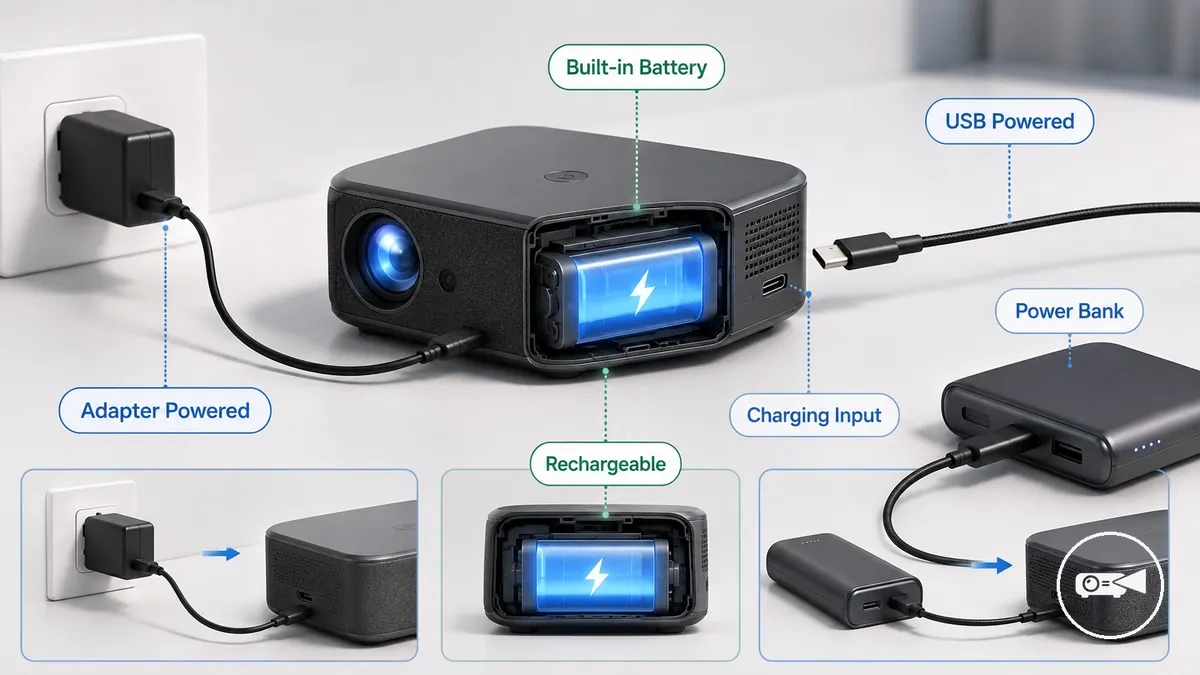
A battery powered mini projector contains stored energy that can operate the projector without a connected wall adapter, while rechargeable means that its battery can be restored through a supported charging input. An adapter powered model requires continuous external power, and a USB powered model receives its operating power through a compatible USB connection rather than necessarily containing a battery. Power bank compatibility is a separate capability: the power bank, cable, and charging input must provide the voltage, output wattage, and charging protocol required by the mini projector. Battery capacity, charging input, and support for charging during live playback must therefore be checked separately.
For portable use, a built-in battery may cover a short movie session, while a longer outdoor use case may require a compatible power bank or continuous adapter connection.
For portable use, a built-in battery may cover a short movie session, while a longer outdoor use case may require a compatible power bank or continuous adapter connection. A practical buying evaluation compares the expected session length with the projector’s stated runtime under the intended brightness mode, then confirms that the available power source can meet its operating input. The broader mini projector guide provides the next comparison context, beginning with the distinction between models that store power internally and models that rely on external adapters or power banks.
Table of Contents
How Mini Projector Battery and Power Systems Differ
Mini projector power systems differ by whether they store power, receive power, or do both. A built-in battery stores energy for cordless operation, while an adapter powered model receives operating power from a wall adapter without storing it internally. A USB powered mini projector receives power through a supported USB input, and a rechargeable model combines stored power with a charging input. The key distinction is between power storage and power input.
The key distinction is between power storage and power input.
The difference matters because portability, charging, and runtime are determined by the power system rather than by the projector's size alone. A built-in battery allows temporary use away from a wall outlet, while an adapter powered model requires continuous external power during operation. USB powered and power bank operation also require a compatible charging input, cable, and sufficient output wattage, so external power support does not mean every USB charger or power bank can run the projector. The comparison below separates how a mini projector stores power from how it receives power.
| Power system type | Power storage | Power input | Practical effect |
|---|---|---|---|
| Built-in battery | Internal rechargeable battery | Requires a supported charging input to recharge | Supports portable use until stored energy is depleted |
| Rechargeable | Stores energy for repeated use | Accepts charging through the supported input | Can be recharged between viewing sessions |
| Adapter powered | No operating battery required | Wall adapter provides continuous operating power | Long runtime is available while connected to external power but portability is limited by the cable |
| USB powered | May include an internal battery or rely entirely on USB input | Requires a USB input that matches the projector's supported voltage and power requirements | Portable operation is possible only when the connected USB source meets the required power specification |
| Power bank compatible | Uses external stored energy | Requires a compatible power bank, cable, and supported charging protocol | Can extend portable operation when the projector supports external power during use |
Built-in rechargeable batteries
A built-in rechargeable battery is internal stored power that lets a mini projector operate without a continuous mains connection. The illustration labels the internal battery area, charging cable, battery status indicator, and compact body without implying a model-specific teardown. Battery capacity sets the available energy reserve, so higher usable capacity generally supports longer runtime under the same brightness load and playback mode.
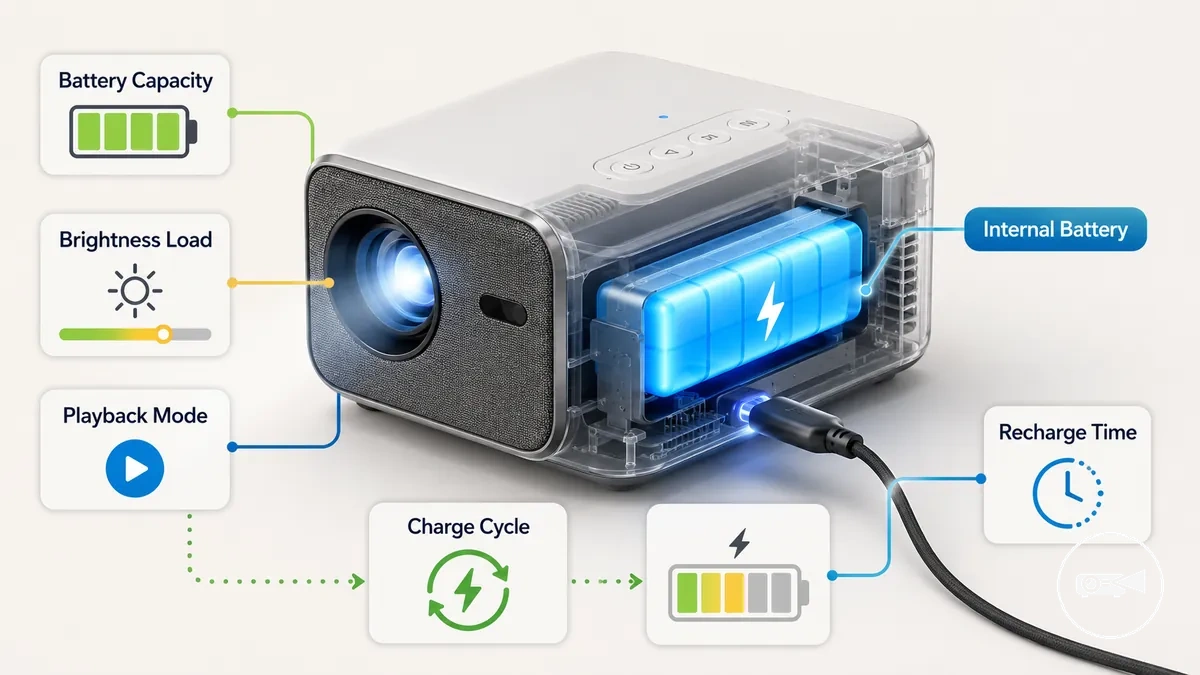
Runtime becomes shorter when playback mode increases power demand or when battery age and repeated charge cycles reduce usable capacity; a fresh battery therefore provides more playback time than an aged battery under equivalent settings. For example, increasing brightness while streaming video will drain stored power faster than using a lower-brightness playback mode. Recharge time is shortest when the specified adapter and charging input provide power while the projector is switched off, although readiness can take longer if the projector remains in use during charging.
External Adapters, USB Power, and Power Banks
External adapters, USB power, and power banks can extend mini projector use only when the external power source matches the projector's required power input. Compatibility requires the correct connector, supported voltage, sufficient amperage, and adequate output wattage. A USB-C charger or power bank must also provide the required Power Delivery profile if the projector relies on USB-C Power Delivery for operation. Verify the input requirements before connecting an external power source.
Verify the input requirements before connecting an external power source.
External adapters, USB power, and power banks are illustrated below to show how compatible power paths are verified for a mini projector.
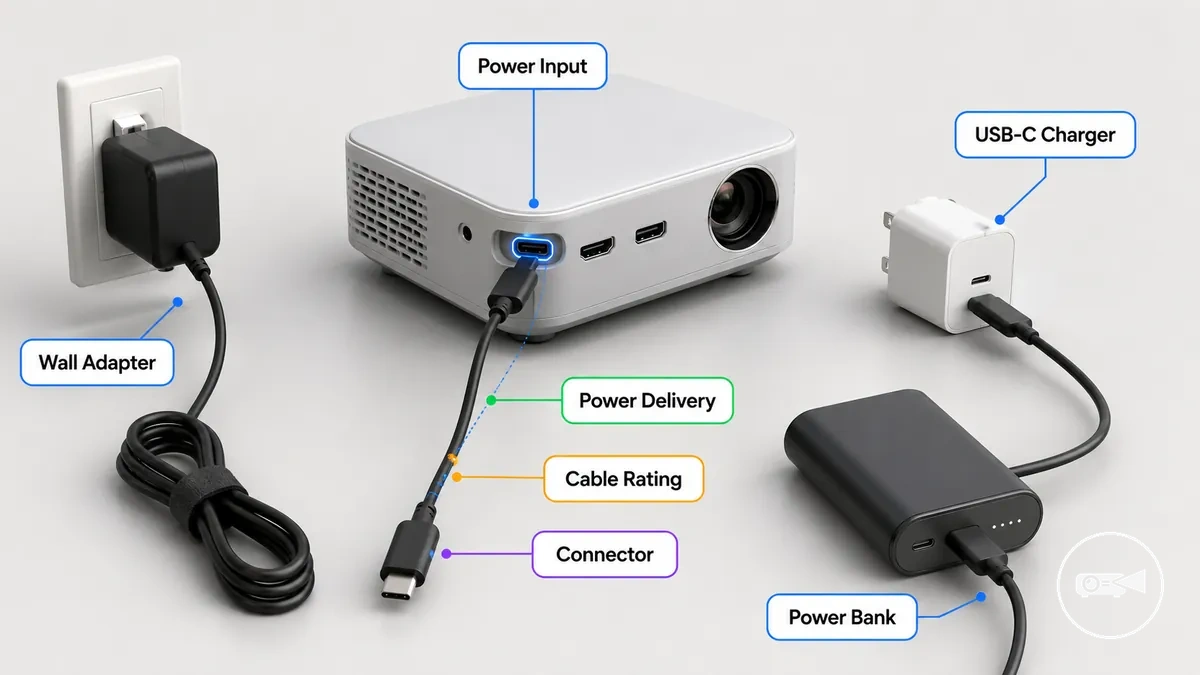
A common compatibility problem is using a power source that can charge the battery but cannot supply enough sustained power for live playback. Another frequent issue is a mismatch in connector type, cable rating, or USB-C Power Delivery support, which can prevent charging or cause the projector to shut down under load. Use the checklist below to confirm that the external power source matches the projector's requirements.
Use the checklist below to confirm that the external power source matches the projector's requirements.
Compatibility checklist for external adapters, USB power, and power banks:
- Confirm that the connector matches the projector's power input.
- Check that the supplied voltage matches the projector's specified input requirement.
- Ensure the available amperage and output wattage are sufficient for charging or continuous operation, as required.
- If using a USB-C charger or power bank, verify that both the projector and charger support the required Power Delivery profile for the intended charge or run mode.
- Use a cable with an appropriate cable rating for the required power level to avoid charging failures or unstable operation.
Battery Life Expectations for Portable Mini Projectors
Battery life for a portable mini projector can be sufficient for a complete playback session if the battery capacity matches the operating conditions, but real runtime changes with how the projector is used. Higher brightness mode, continuous speaker use, wireless use, and demanding content all increase power demand and shorten battery runtime compared with lower-power settings. A portable mini projector used for presentations often places a different load on the battery than one streaming a full movie outdoors. The most reliable battery life expectation considers battery capacity together with brightness mode, speaker use, wireless use, and ambient condition.
As a result, stated battery life reflects test conditions and may differ from real use.
A short presentation often places a lighter and less continuous load on the battery than a full movie session, while portable outdoor use can reduce runtime further when higher brightness is needed to improve image visibility. Streaming over Wi-Fi or Bluetooth and relying on the built-in speaker also increase power demand during a playback session. For example, a projector showing presentation slides with moderate brightness may complete the session more comfortably than the same projector streaming a high-brightness movie outdoors. As a result, stated battery life reflects test conditions and may differ from real use.
The table below organizes common runtime expectations by operating condition instead of suggesting a fixed battery life.
Battery life expectations for portable mini projectors become easier to judge when runtime is matched to the intended viewing session rather than a single advertised figure. The table below organizes common runtime expectations by operating condition instead of suggesting a fixed battery life. Comparing battery capacity with brightness mode, speaker use, wireless use, and the planned playback session provides a more realistic buying and usage decision.
| Use condition | Typical runtime expectation | Main factors affecting battery life |
|---|---|---|
| Short presentation | More likely to complete the session when brightness demand is moderate | Battery capacity, brightness mode, speaker use |
| Movie session | May require reduced brightness or external power for longer playback | Continuous video playback, speaker use, wireless use |
| Portable outdoor use | Often provides shorter runtime if higher brightness is needed | Brightness mode, ambient condition, battery capacity |
Typical Runtime Ranges
Typical runtime for a battery powered mini projector depends on operating mode and playback load: eco mode provides the longest battery runtime, standard mode provides a shorter middle range, and maximum brightness produces the shortest runtime because display power draw increases. Official specifications illustrate the model variation: XGIMI states up to 1.2 hours of video playback for the Vibe One in eco mode, while BenQ specifies up to 160 minutes for the GV10 under its eco-mode video conditions. External speaker use can shorten a playback session when the speaker draws power from the projector, whereas an independently powered speaker does not add that direct load. The typical runtime ranges below organise these mode-and-load effects as conditional expectations.
| Mode or load | Runtime expectation | Condition or trade-off |
|---|---|---|
| Eco mode | Longest available runtime; documented model examples range from up to 1.2 hours to up to 160 minutes | Lower brightness reduces power draw, with image brightness as the principal trade-off |
| Standard mode | Shorter than eco mode and longer than maximum brightness under the same playback load | Balances image brightness and battery use; the reviewed sources do not specify one class-wide duration |
| Maximum brightness | Shortest runtime among the listed brightness modes | Higher display draw supports a brighter image but consumes stored battery energy faster |
| External speaker | Shorter runtime when the speaker receives power from the projector; no direct speaker-power reduction when it uses its own battery | USB power draw adds to battery use, while Bluetooth or audio transmission can still add a smaller wireless playback load |
Brightness Mode, Speaker Use, and Playback Conditions
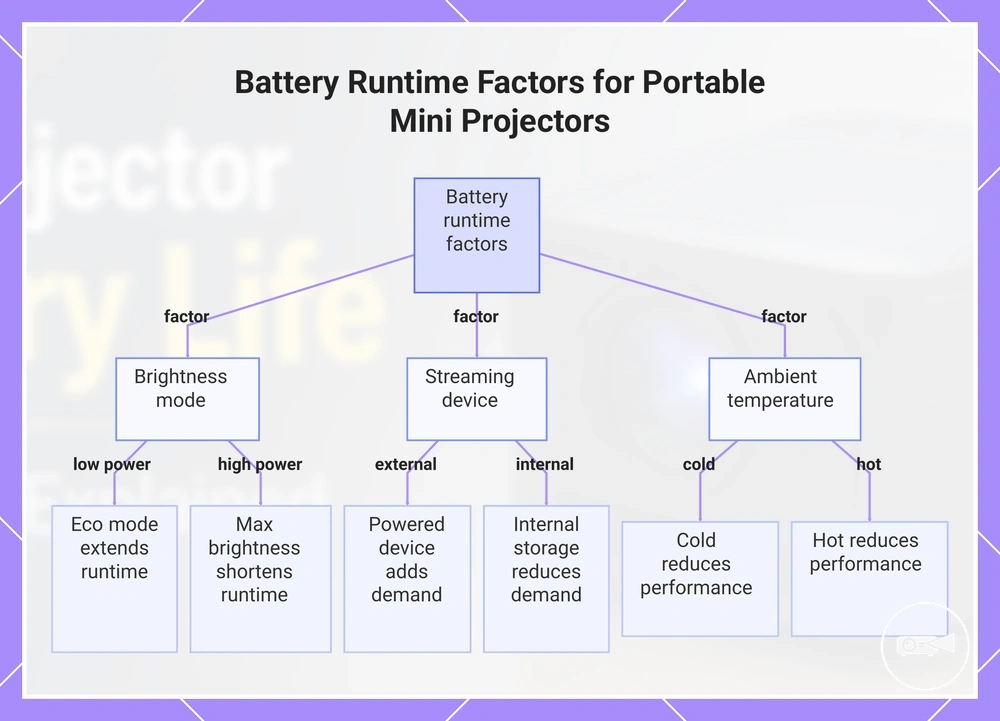
Real battery runtime changes when a portable mini projector works harder during playback because higher operating demand consumes stored battery power more quickly. Higher brightness mode, louder built-in speaker use, powered streaming devices, active wireless connection, and unsuitable ambient temperature each increase power demand or reduce battery efficiency under their respective conditions. Lower-load viewing conditions generally extend runtime compared with higher-load playback. The criteria below show how each condition affects runtime expectations during battery-powered use.
- Brightness mode: Eco mode or another low-power image mode reduces display power demand and typically extends runtime, while maximum brightness increases power demand and shortens runtime during the same viewing session.
- Built-in speaker: Higher built-in speaker volume increases audio load and can shorten battery runtime, whereas moderate speaker use places a lighter demand on the battery.
- Streaming device: A streaming device powered by the projector adds extra power demand during playback, so runtime is generally shorter than when media is played directly from internal storage or another independently powered source.
- Wireless connection: Active Wi-Fi or Bluetooth connections require additional operating power during a playback session, while disabling unused wireless features can reduce battery drain when those connections are not needed.
- Ambient temperature: Very cold or very hot ambient temperature can reduce effective battery performance, so runtime is typically closer to the stated expectation when the projector operates within the manufacturer's recommended temperature range.
This chart shows the main conditions that influence battery runtime during playback, including brightness mode, streaming device power, and ambient temperature.
Mini Projector Power Consumption and Wattage
Mini projector power consumption is the electricity draw used while the projector is operating, and wattage expresses that operating load in watts. Higher wattage means the projector requires more electrical power from its adapter, battery, or power bank during use. Rated power identifies the designed input requirement, but real playback load can be lower or higher within the device's supported operating modes. Wattage therefore helps determine whether an external power source can sustain the projector rather than merely charge it while switched off.
Higher wattage means the projector requires more electrical power from its adapter, battery, or power bank during use.
Electricity draw increases when brightness output, projection technology, or speaker load requires more operating power, while an eco or low-brightness mode normally reduces energy use and heat compared with a high-brightness mode on the same projector. Projection technology also creates different power profiles because LED, laser, LCD, and DLP systems use different light-source and image-processing arrangements. Built-in speakers add audio load during playback, whereas standby behavior uses a lower power state than active projection but may continue drawing electricity while the projector remains connected. These relationships are directional rather than class-wide wattage values because the supported modes and hardware differ by model.
This rated-power check prepares the compatibility decision for charging and continuous operation.
Compare the projector's rated power or input rating with the adapter output before using a replacement adapter or power bank, then check whether the source can provide the required voltage, current, connector, and sustained wattage. For example, an adapter may display a wattage above the projector's measured real load because it is designed to cover peak operating demand and charging overhead. A lower observed playback load does not make an under-rated adapter suitable, because the projector may request more power when brightness output, speaker load, charging, or processing demand rises. This rated-power check prepares the compatibility decision for charging and continuous operation.
For example, an adapter may display a wattage above the projector's measured real load because it is designed to cover peak operating demand and charging overhead.
Mini projector power consumption and wattage can be organised by operating condition to show how each condition changes power draw and power-source requirements without implying one value for every model.
| Operating condition | Power-consumption direction | Practical power-source implication |
|---|---|---|
| Eco or low-brightness mode | Lower electricity draw and lower heat than the projector's high-brightness mode | A compatible adapter or power bank still needs to meet the model's stated input requirement |
| Standard playback | Middle operating load for the supported image, processing, and audio settings | Use the rated power and adapter output rather than an assumed class-wide wattage |
| Maximum brightness output | Higher electricity draw and heat than lower-brightness operation on the same model | The external source must sustain the projector's higher playback load without voltage drop or shutdown |
| Built-in speaker at higher volume | Higher speaker load than muted or lower-volume playback | Allow for combined projection and audio demand when assessing sustained adapter output |
| Standby behavior | Lower energy use than active projection, with residual draw possible while connected | Disconnect the power source when standby consumption is unnecessary |
Power Draw During Playback
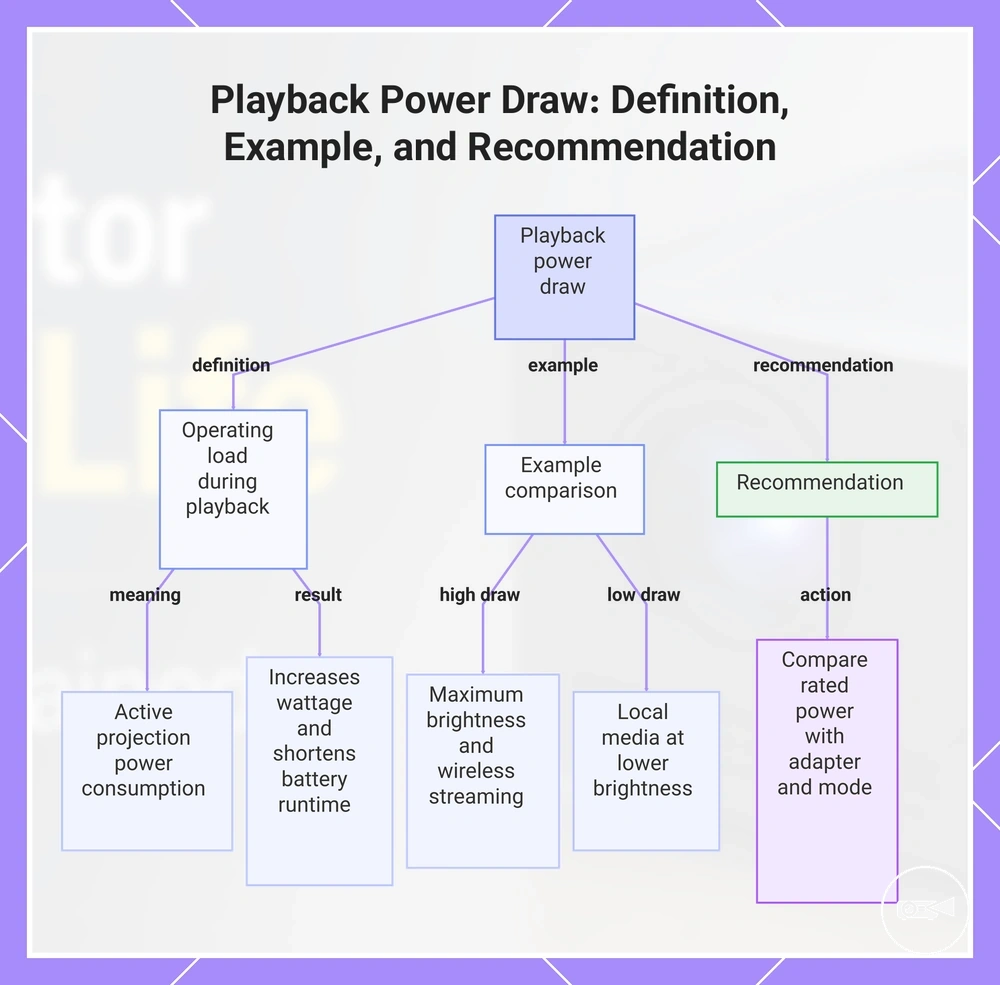
Playback power draw is the operating load a mini projector uses while actively projecting content. During active playback, electricity demand changes with the selected brightness level, audio output, wireless input activity, cooling fan operation, and the content source being processed. Higher operating load typically increases wattage demand and can shorten battery runtime compared with lower-load playback under the same battery capacity. These active-use conditions are the main factors that change playback power draw.
These active-use conditions are the main factors that change playback power draw.
Higher playback power draw also increases the demand placed on the connected power adapter or power bank during operation. For example, switching from an eco image mode to maximum brightness while streaming wirelessly with the built-in speaker enabled requires more operating power than playing local media at lower brightness with moderate audio. The reviewed evidence does not define universal wattage ranges for these active playback states, so compare the projector's rated power with its supported adapter output and operating mode rather than assuming a fixed playback draw.
Higher playback power draw also increases the demand placed on the connected power adapter or power bank during operation.
This chart explains what playback power draw is, shows a comparison of high and low draw scenarios, and provides a key recommendation for comparing power ratings.
How Brightness and Projector Type Change Power Use
Higher brightness settings and projector type usually increase energy demand in different ways. A mini projector that raises lumen output places more load on its light source, while its LED or other projection system determines how efficiently electrical power becomes visible light. Image mode, fan behavior, and resolution processing add further operating load when the projector prioritises brighter output, additional cooling, or more complex image processing. These criteria explain why power use changes across projector designs and operating modes without assigning an exact wattage to every type.
- Brightness settings: A higher brightness mode increases light-source demand compared with an eco or low-brightness mode on the same projector, which raises power use and can reduce battery runtime.
- LED and projection system: LED, laser, lamp-based, LCD, and DLP designs use different light-generation and image-forming components, so projector type changes the amount of energy required for a given operating condition.
- Lumen output: Producing higher lumen output generally requires greater light-source power than producing lower output within the same projector design, increasing energy demand and heat.
- Image mode and fan behavior: High-brightness or performance-oriented image modes can increase heat, causing the cooling fan to operate more actively and add a smaller secondary load to total power use.
- Resolution processing: Higher-resolution or more complex image processing can increase processor activity compared with simpler playback, although the size of the power-use effect remains model- and content-dependent.
Charging Requirements and Compatible Power Sources
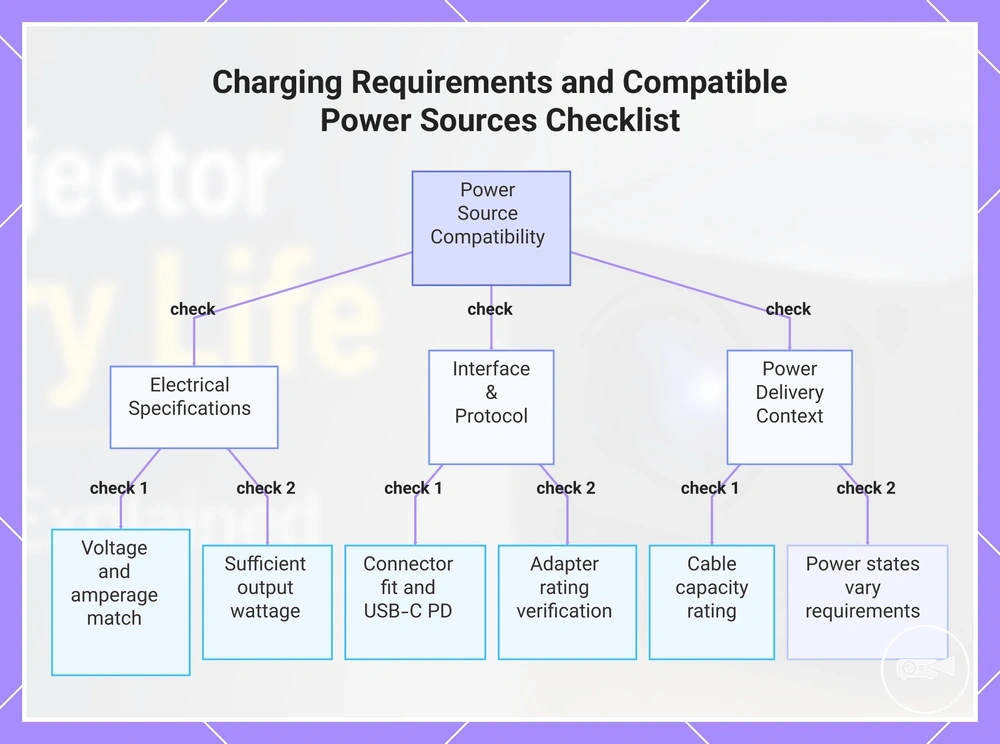
A power source is compatible only when its output matches the mini projector's input requirements. The connector must fit, but the required voltage, supported amperage, and output wattage must also align with the projector input or adapter rating. USB-C Power Delivery support must be present on both devices when the projector requires negotiated USB-C power. Compatible power sources therefore require an electrical input-output match rather than a connector-shape match alone.
A power source is compatible only when its output matches the mini projector's input requirements.
A matching connector with the wrong voltage can prevent operation or risk damaging equipment, while insufficient amperage or wattage can produce slow charging, battery drain during playback, or a no-power outcome. The adapter rating identifies the voltage and current the original power source is designed to provide, and multiplying those values gives its rated wattage. For USB-C Power Delivery, the charger or power bank must offer a supported voltage profile and enough output wattage for the projector's requested operating state. Cable capacity also matters because a cable rated below the required current or wattage can restrict delivered power even when the charger has adequate output. Use the checklist below to verify charging requirements and compatible power sources before connecting external power.
- Connector: Confirm that the plug or USB-C port matches the projector input; a physical fit without the correct electrical specification does not establish compatibility.
- Voltage: Match the power source's supported output voltage to the projector's stated input voltage; an unsupported voltage can result in no charging, no operation, or equipment risk.
- Amperage: Use a source that can supply at least the projector's required current at the specified voltage; a lower available current can limit charging speed or cause the battery to discharge during use.
- Output wattage: Choose an adapter or power bank with sufficient sustained wattage for the intended state; output below the operating load can support slow charging while switched off but fail to maintain live playback.
- USB-C Power Delivery: Verify that the projector, charger, and selected port support USB-C Power Delivery when negotiated power is required; a USB-C connector without PD support may provide only basic or no usable power.
- Adapter rating: Compare the replacement source with the voltage, amperage, and polarity or PD profile stated on the original adapter or projector label; matching or exceeding current capacity is acceptable only when voltage and interface requirements also match.
- Cable capacity: Use a cable rated for the required current and wattage; an under-rated cable can reduce delivered power and lead to slow charge, intermittent operation, or a no-power outcome.
Charging the internal battery, running the projector during playback, and topping it up from a power bank are different power states rather than equivalent tasks. A lower-output source may charge the battery while the projector is off yet provide less power than active playback consumes, while a higher supported output may maintain operation and charge simultaneously. Power bank capacity determines stored energy, but its port output and supported voltage profile determine whether that energy can reach the projector at the required rate. Verify the projector input label, adapter rating, USB-C Power Delivery profile, and cable capacity for the intended operating state before use.
Verify the projector input label, adapter rating, USB-C Power Delivery profile, and cable capacity for the intended operating state before use.
This chart shows the key checks to verify that a power source is compatible with a mini projector, covering electrical specifications, interface protocols, and power delivery context.
USB-C Charging and Power Delivery Requirements
USB-C does not automatically mean a mini projector supports high-power USB-C charging or live playback from the port. A compatible outcome requires the projector's USB-C input to support Power Delivery and accept a voltage profile and required wattage offered by the charger. The USB Implementers Forum defines USB Power Delivery as negotiated power over USB-C, so connector shape alone does not confirm the supported power profile. Check the projector label or manual, charger label, and cable rating before use.
Check the projector label or manual, charger label, and cable rating before use.
USB-C charging and Power Delivery requirements should be verified at label level because the charger, projector, and cable must support the same power path. A lower supported profile can produce slow charge or charge only while the projector is off, while live playback requires output that meets the projector's active operating load. The reviewed evidence does not specify one required wattage for all mini projectors, so use the model's stated USB-C input and charge-versus-run requirements as the compatibility boundary.
- Power Delivery support: Confirm that the projector's USB-C port explicitly accepts USB Power Delivery; a data-only or basic-power port is incompatible with PD charging.
- Required wattage: Match the charger's supported output wattage to the projector's stated USB-C input; insufficient output can cause slow charging, battery drain during use, or shutdown.
- Voltage profile: Verify that the PD charger offers a voltage profile accepted by the projector; unsupported profiles produce no negotiated high-power output.
- Cable rating: Use a charging cable rated for the required current and wattage; a lower cable rating can restrict delivered power even when the charger supports the correct profile.
- Charge-versus-run behavior: Check whether the stated USB-C input supports charging while off, topping up during light use, or running during live playback, because these states can require different output levels.
Adapter, Cable, and Power Bank Limits
Even when a mini projector is compatible, an under-rated adapter, cable, or power bank can prevent charging or stable playback. A compatible power source must match the required output rating, connector fit, and, where supported, Power Delivery (PD), while a power bank also needs enough capacity and sustained wattage for the intended operating condition. Capacity stores energy, but sustained wattage determines whether the projector can continue running without reduced runtime, slow charging, shutdown, or incompatibility. Use the following checks to identify adapter, cable, and power bank limits before connecting the projector.
Use the following checks to identify adapter, cable, and power bank limits before connecting the projector.
Adapter, cable, and power bank limits can be checked by comparing each component's power-delivery conditions with the projector's stated input requirements.
- Adapter: Match the output rating, connector fit, and supported voltage to the projector's specified input; an under-rated power adapter can lead to charging failure or shutdown during operation.
- Cable: Use a charging cable that supports the required current and, where applicable, PD support; an under-rated cable can restrict power delivery even when the adapter is suitable.
- Power bank output: Verify that the portable charger can provide the required sustained wattage during playback, not only enough power to recharge the battery while the projector is switched off.
- Power bank capacity: Capacity determines how long stored energy is available, whereas sustained wattage determines whether the projector can run continuously without reduced runtime or unexpected shutdown.
- Compatibility outcome: When the output rating, connector fit, PD support, capacity, and sustained wattage all satisfy the projector's stated requirements, charging and playback are more likely to operate as intended; otherwise, incompatibility, slow charging, or reduced runtime can occur.
Choosing Between Built-In Battery and External Power
A built-in battery is the better power approach for short portable sessions, while external power is the more reliable choice for longer viewing sessions or higher brightness needs. The right selection depends on session length, location, brightness needs, access to mains power, and the charging requirement of the mini projector. A built-in battery increases portability value but introduces runtime risk as stored power is depleted, whereas external power can support continuous operation when a compatible power source is available. Choose the power approach by weighing these conditions rather than assuming one option is universally better.
Choose the power approach by weighing these conditions rather than assuming one option is universally better.
Travel and casual viewing usually favour a built-in battery because carrying fewer accessories improves portability. Indoor movie sessions with nearby mains power generally favour external power because longer viewing length and higher brightness settings can increase energy demand without relying on stored battery capacity. Presentations often benefit from external power when a wall outlet is available because avoiding battery depletion reduces the risk of interruptions during extended use. Outdoor or power-restricted locations favour a built-in battery when portability is the priority, although session length remains limited by available battery capacity unless a compatible external power source is also available.
Battery convenience should not outweigh the practical limits of charging and runtime.
Battery convenience should not outweigh the practical limits of charging and runtime. A built-in battery reduces cable dependence during portable use, but external power can provide greater reliability for extended sessions where wall power is accessible. The comparison below helps match each use case with the most suitable power approach.
The comparison below helps match each use case with the most suitable power approach.
Choosing between built-in battery and external power is easier when the selection is based on the intended use case rather than the battery type alone.
| Use case | Preferred power approach | Charging requirement | Runtime risk | Selection outcome |
|---|---|---|---|---|
| Short portable session | Built-in battery | Recharge before use | Battery capacity limits viewing length | Higher portability value with fewer cables |
| Longer movie session | External power | Compatible wall power or external supply | Lower risk of interruption while power remains available | Better suited for extended viewing and higher brightness needs |
| Presentation | External power | Access to mains power preferred | Reduced risk of battery depletion during use | More reliable for longer continuous operation |
| Power-restricted location | Built-in battery | Battery should be fully charged before use | Runtime is limited by stored battery capacity | Improves portability where mains power is unavailable |
When Battery Powered Use Is Practical
Battery powered use is practical when the session is short, brightness demand is moderate, and the mini projector's stated runtime covers the planned viewing period. The use case becomes riskier when high brightness, long session length, or limited charging access increases battery demand. Portability need can justify battery-only use, but the available charge must still support the location and viewing conditions. The following scenarios show when battery operation is a realistic choice and which limitation to check.
- Short sessions: Battery powered use fits short viewing where the planned session length remains below the projector's stated runtime for the selected brightness mode; check that the remaining charge includes a margin for setup and playback.
- Travel use: An internal battery supports travel use when portability need outweighs access to continuous power; confirm that charging access is available before the next session.
- Small rooms: Battery-only use is practical in a small room when moderate brightness provides a usable image; brighter modes increase power demand and can shorten the available runtime.
- Light outdoor viewing: Light outdoor viewing can suit battery operation in shaded or low-ambient-light conditions; strong surrounding light can require higher brightness and create a greater runtime risk.
- Power-restricted locations: A built-in battery is useful where mains power is unavailable and the planned session fits within stored capacity; limited charging access makes repeated or extended use less practical.
When Plugged-in Power Is the Safer Choice
Plugged-in power is the safer choice when session length or increased power need exceeds the realistic support available from a built-in battery. Long playback, high brightness, external speakers, low battery health, or extended outdoor session length can increase energy demand and raise the likelihood of runtime interruption. Battery operation remains practical for shorter, lower-demand sessions, but reliable power better supports uninterrupted viewing when these higher-demand conditions apply. Use the following checklist to verify when plugged-in power is the safer choice.
- Long playback: Choose plugged-in power when the planned viewing session is expected to exceed the projector's stated battery runtime for the selected operating mode.
- High brightness: Higher brightness settings increase power demand and can reduce battery runtime, making continuous wall power a more reliable option.
- External speakers: External speakers or other connected accessories can increase overall power use; confirm the remaining battery capacity if mains power is unavailable.
- Low battery health: A battery with reduced capacity stores less usable energy than when new, increasing the risk of the projector shutting down before the session ends.
- Outdoor session length: Longer outdoor viewing, particularly where higher brightness is needed and charging access is limited, is generally better suited to plugged-in power when a reliable supply is available.
Battery and Power Needs for Outdoor Mini Projector Use
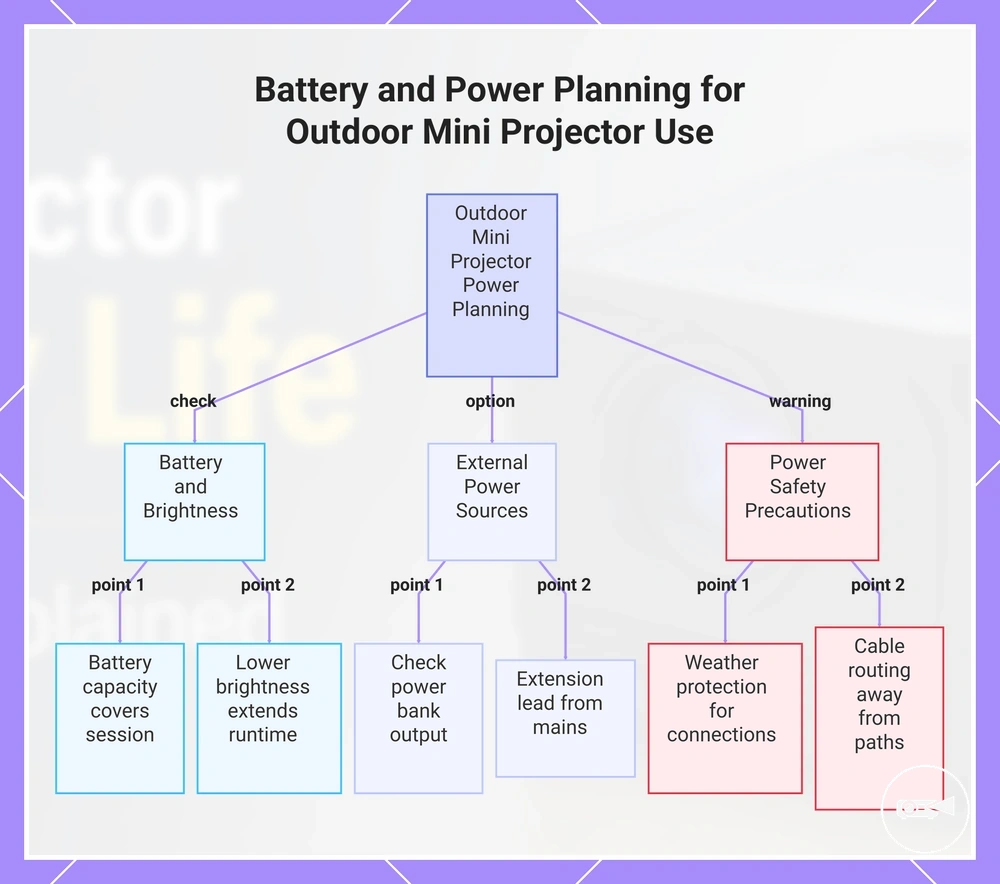
Outdoor mini projector use requires more careful power planning because battery runtime, distance from power outlets, and session length affect whether viewing can continue without interruption. Higher brightness mode often increases battery drain, while longer viewing sessions can exceed the practical capacity of a built-in battery. An external power source can reduce runtime risk when compatible with the projector's power requirements. The main outdoor power variables are battery runtime, brightness mode, extension power availability, power bank output, weather exposure, and session length.
An external power source can reduce runtime risk when compatible with the projector's power requirements.
Outdoor use is practical when battery runtime, brightness mode, and external power match the planned session. A compatible power bank with sufficient output or reliable extension power can support longer viewing when the internal battery alone is unlikely to last for the full session. For example, an evening backyard movie may benefit from external power if higher brightness is needed for the surrounding light conditions or the viewing session is expected to continue beyond the projector's battery capacity. Keep extension cables away from walking paths and protect power connections from weather exposure to reduce the risk of accidental disconnection or moisture-related damage.
This section focuses only on battery and power planning rather than complete outdoor setup guidance.
This section focuses only on battery and power planning rather than complete outdoor setup guidance. For broader considerations such as viewing conditions and installation, see outdoor mini projector use, because outdoor suitability also depends on brightness and setup conditions that are covered separately.
Battery and power needs for outdoor mini projector use can be checked quickly by reviewing the following power-related conditions before starting the session.
Battery and power needs for outdoor mini projector use can be checked quickly by reviewing the following power-related conditions before starting the session.
- Battery runtime: Confirm the available battery capacity covers the planned session length with a reasonable reserve.
- Brightness mode: Use a lower brightness mode when practical to reduce battery drain and extend operating time.
- Power bank output: Verify the power bank supports the projector's required input before relying on it as the primary power source.
- Extension power: Use a safe extension lead when a nearby mains outlet provides a more reliable power supply than the internal battery.
- Weather exposure: Keep the projector, power bank, adapters, and cable connections protected from rain, moisture, and excessive heat.
- Cable placement: Route power cables where they are unlikely to become trip hazards or be accidentally disconnected during safe viewing.
This chart shows the key power-related checks and options to ensure uninterrupted outdoor viewing with a mini projector.
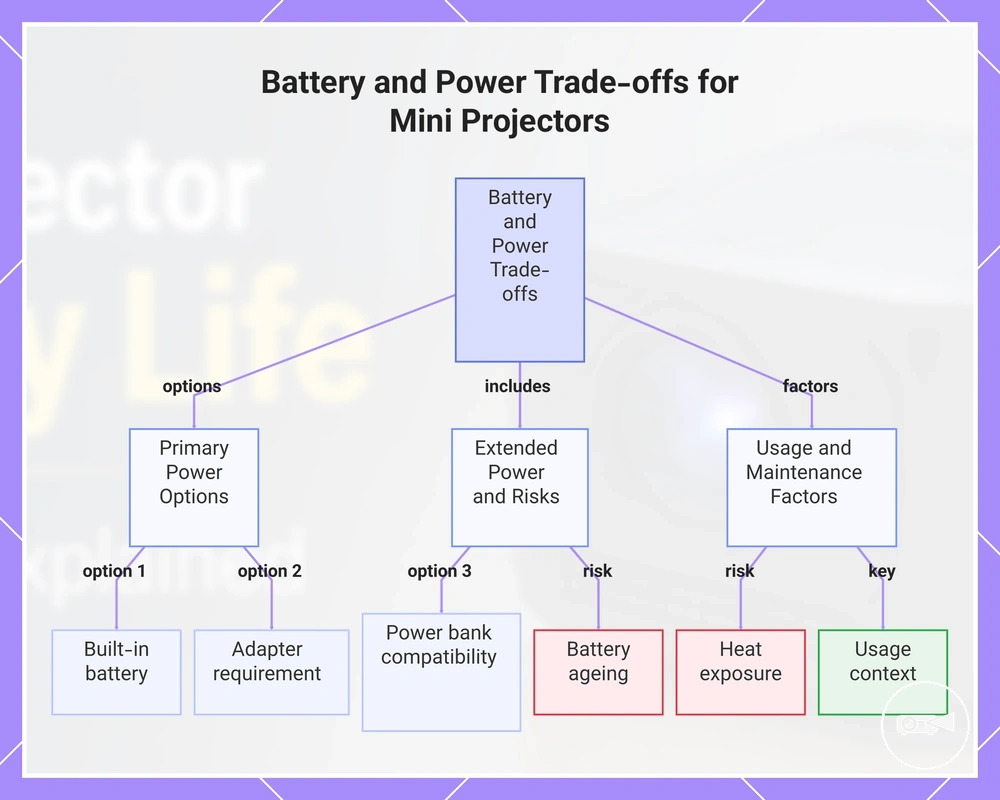
Battery and Power Trade-offs Before Buying
Battery convenience adds value only when it matches your expected runtime and available power sources. A mini projector with a built-in battery improves portability for short viewing sessions, while a model that relies on continuous external power can provide greater power reliability for extended use. The most useful buying decision balances portability, viewing length, accessory needs, and long-term value rather than focusing on battery presence alone.
Battery convenience adds value only when it matches your expected runtime and available power sources.
A built-in battery reduces dependence on wall outlets but does not remove the need to check runtime limits before purchase. An adapter requirement provides continuous operation where mains power is available, while power bank compatibility can extend portable use only if the projector accepts a compatible external power input. Buying a projector without confirming its supported power options increases purchase risk because additional accessories may be required for the intended usage context.
The practical decision signal is whether portability or uninterrupted viewing is the higher priority.
Short portable viewing usually benefits more from battery convenience than long movie nights or outdoor sessions. Longer viewing sessions are more reliable when continuous adapter power or a compatible power bank supports the projector throughout playback. For example, a brief presentation away from a power outlet may suit a built-in battery, whereas an evening movie is more likely to benefit from external power. The practical decision signal is whether portability or uninterrupted viewing is the higher priority.
Long-term value is strongest when the selected power approach matches normal viewing habits.
Battery convenience improves portability, whereas continuous external power usually offers greater reliability for longer sessions. Choosing between these approaches should reflect the expected usage context rather than assuming either option has higher value in every situation. For a broader comparison of overall ownership benefits beyond power alone, see mini projector value and limitations. Long-term value is strongest when the selected power approach matches normal viewing habits.
Reviewing expected maintenance before purchase helps reduce long-term value limitations.
Battery ageing gradually reduces stored energy, and repeated exposure to heat can increase the maintenance burden over time. A replaceable or externally powered solution may reduce the effect of declining battery capacity for users who mainly watch longer sessions, while a built-in battery remains valuable when portability is the main requirement. For ongoing care and ownership considerations beyond buying decisions, see mini projector maintenance and lifespan. Reviewing expected maintenance before purchase helps reduce long-term value limitations.
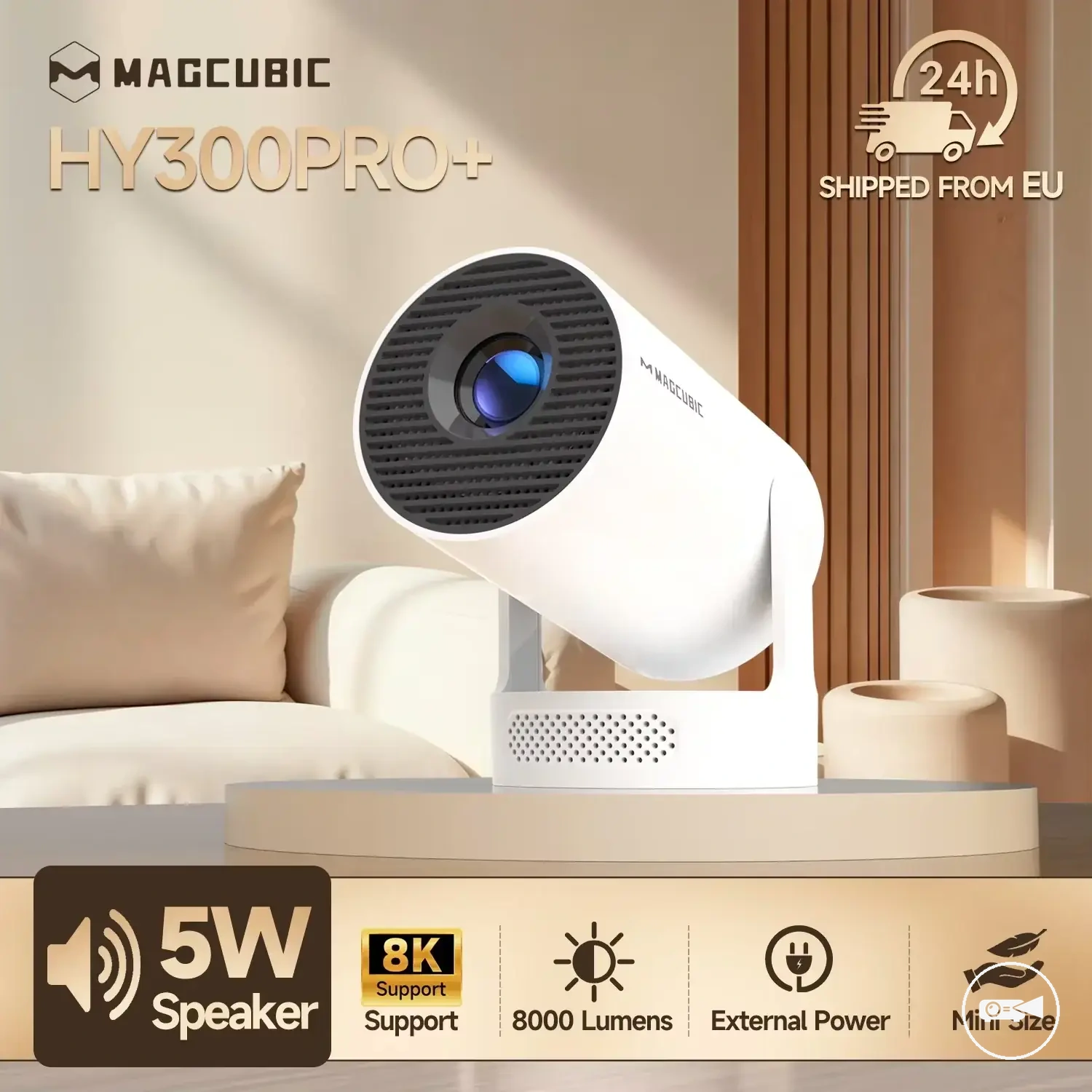
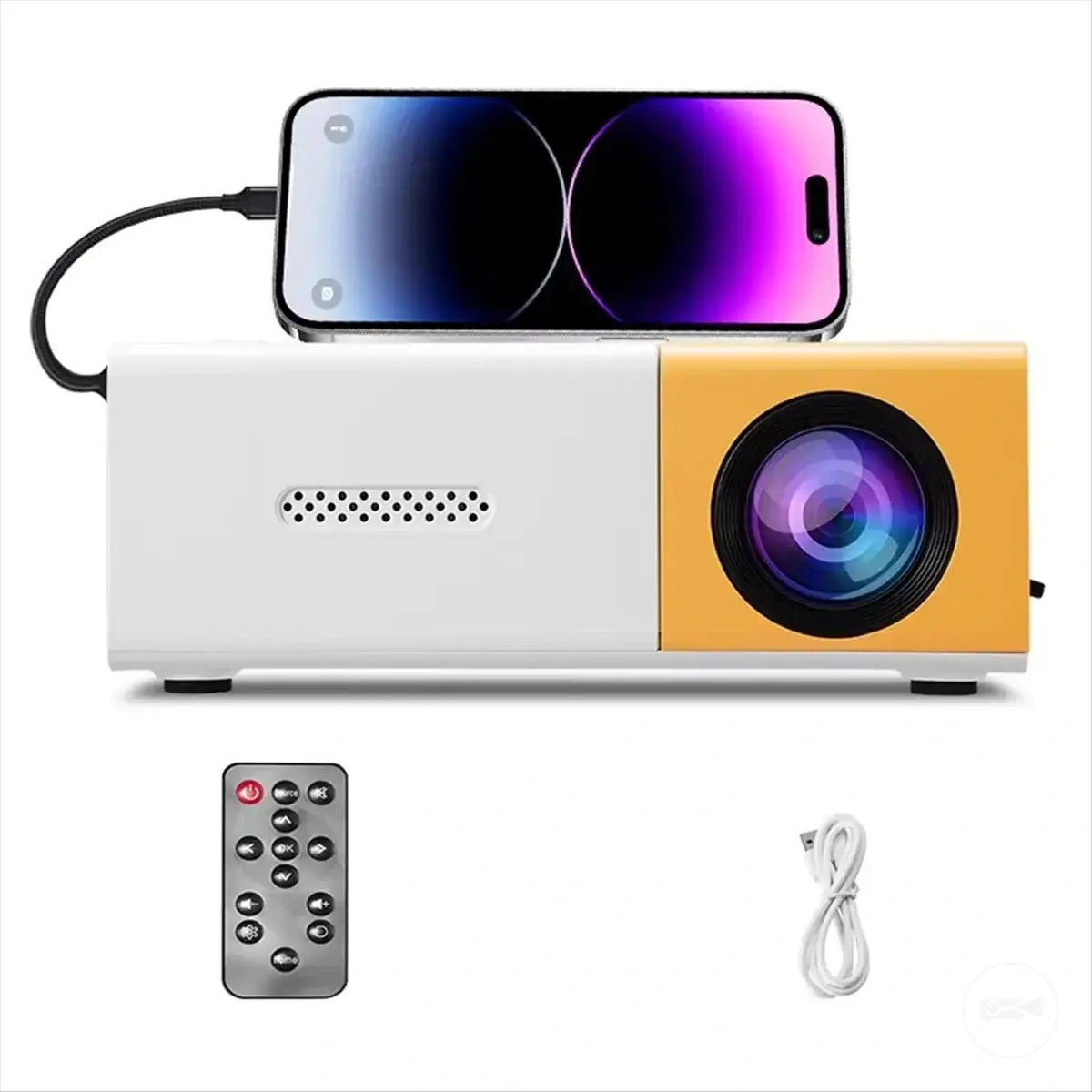
Here are product examples that may make comparison easier.
Here are product examples that may make comparison easier. Before buying, always review the compatibility criteria, essential features, and product details.

Battery and power trade-offs before buying become easier to compare when each power attribute is linked to its value effect or purchase risk.
- Built-in battery: Improves portability but is limited by available battery runtime.
- Adapter requirement: Supports longer uninterrupted viewing but reduces portability where mains power is unavailable.
- Power bank compatibility: Can extend portable operation when the projector supports a compatible external power input; unsupported input creates purchase risk.
- Battery ageing: Reduces available stored energy over time and can shorten practical runtime.
- Heat exposure: Higher operating temperatures can increase long-term maintenance burden.
- Usage context: Matching portability or power reliability to normal viewing habits improves long-term value and reduces buying regret.
This chart shows the main power options, long-term risks, and usage factors to consider when choosing between portability and reliability in a mini projector.